If you’re exploring gamified calorie tracking with virtual pet support in 2026, start here. Download free on Android today →. That gap between week two and day 66 is where most apps lose you. A friendly nudge, fast logging, and visible progress make the difference.
In fact, a virtual buddy gives you something to care for. You see it grow when you walk more steps, drink water, and eat balanced meals. That spark of care, and the “I don’t want to let my buddy down” feeling, keeps you coming back. For more background on the pitfalls of manual logs, this piece on why manual calorie tracking fails breaks down skipped entries and late-night backfills that break streaks.
Why Beginners Quit Calorie Tracking (and What Actually Keeps Them Going)
Most beginners don’t quit because they “lack discipline.” They quit because the app feels like a spreadsheet strapped to their day. Decision fatigue sets in. After 12+ small food choices, the brain wants a break, not a database search.
However, there’s a better way. You need fast logging, kind feedback, and a reason to return that isn’t the scale. Gamified calorie tracking with virtual pet design gives that reason. You care for a buddy that reacts to what you do, not just what you weigh.
Specifically, here are the common blockers you face:
- Decision fatigue from constant choices and portion guesses.
- No instant reward after logging, so motivation fades fast.
- Overwhelm from massive food databases with near-duplicate entries.
- Guilt spirals when a bad day ruins a streak—and you stall for days.
Related research on habit formation timelines: Lally et al., 2010 (European Journal of Social Psychology), see PubMed summary at https://pubmed.ncbi.nlm.nih.gov/19685919/.
The Psychology That Keeps You Going
Habits take time, anywhere from 21 to 66 days to feel automatic, per research (see PubMed link above). In that window, you need small wins you can see today. A virtual pet that grows with your choices gives visible progress that the scale can’t always show.
Moreover, positive reinforcement beats punishment for beginners. A nudge like “Nice protein hit!” sticks better than “You blew your budget.” In addition, your buddy’s reactions create gentle accountability. It’s easier to log when something is “waiting for you,” not judging you.
Therefore, the ideal starter experience is low-friction logging, kind coaching, and a buddy that mirrors your effort. That makes tomorrow’s log more likely than today’s excuse.
- Week-one quick wins to look for:
- A 10-second breakfast log using photo capture.
- One balanced plate that earns a buddy “evolution” nudge.
- A filled hydration ring by early afternoon.
- A friendly message after a walk that celebrates steps, not just calories.
“Small, near-term rewards help early habits stick. Caring for something—even a digital companion—creates a reason to show up.”
For more simple tactics that avoid shame loops, this guide on calorie tracking mistakes shows fixes beginners can use on day one.
What to Look for in a Gamified Calorie Tracker as a Beginner
Not all “cute pet” trackers help with food logs. Some are skins on standard apps. You want features that cut friction and build confidence in 2026, not fluff. Here are six criteria to test in a free trial and how to spot the real thing.
1) Logging Simplicity
Photo-based meal logging should scan your plate and return calories and macros in seconds. During your trial, time how long it takes to log breakfast. If you still need five taps and a database search, it will wear you down on day four.
2) Virtual Pet That Actually Responds
A real companion should react to meals, water, and steps, good and not-so-good. If the pet only levels up no matter what, it’s a sticker, not a coach. Try logging a balanced lunch, then a dessert. The pet should celebrate balance and nudge better choices tomorrow.
3) Macro Depth Without Overwhelm
As a beginner, you need calories plus carbs, protein, and fat. That’s it. During the trial, check if macros display clearly without dense charts. You want a snapshot that helps you adjust the next meal, not a lab report.
4) Offline Catch-Up
Life happens. You’ll miss a log at a restaurant or on the train. Ensure the app supports offline logging and auto-sync. Test it: go to airplane mode, log a snack, and see if it syncs when you’re back online.
5) Steps and Wearables
Your daily burn matters. As a result, the app should sync with Google Fit and turn steps into useful context for your day’s target. In your trial, connect your wearable and check if step counts update within minutes.
6) Community Without Judgment
A light social layer helps. You should be able to share meals and wins with supportive peers. Post a meal and see the tone of comments. You want encouragement, not “macro policing.
For a broader lay-of-the-land before you test, here’s a plain-language guide to calorie tracking apps that explains the trade-offs between scanners, photo tools, and manual entry.
A 7-Day Trial Checklist You Can Use
- Day 1: Time your first photo log from snap to save; aim for under 15 seconds.
- Day 2: Log offline during a commute; confirm auto-sync later.
- Day 3: Post a meal to the community; assess tone and helpfulness.
- Day 4: Eat dessert; check if pet reactions and coaching stay supportive.
- Day 5: Connect Google Fit; verify steps update within five minutes.
- Day 6: Skim your macro snapshot; plan one small tweak for dinner.
- Day 7: Review streaks and rewards; ask yourself, “Do I feel nudged, not judged?
Also Read!
Calorie Tracker Buddy vs Lose It! for Beginners: Which Is Better for AI Photo Calorie Counting?
How Calorie Tracker Buddy Makes Calorie Tracking Feel Like a Game
Calorie Tracker Buddy was built around the beginner roadblocks above. Instead of a static log, you get a virtual buddy that grows as you build streaks with food, steps, and hydration. This is the heart of the gamified calorie tracking with virtual pet approach, and it feels like you’re looking after a small friend, not chasing a number.
Your Virtual Buddy, Growing With Your Choices
Each healthy choice feeds growth. Hit your 10,000-step goal? Your buddy cheers and levels up. 2.5L daily target?
You’ll see hydration rings fill and your buddy perk up. Log a balanced dinner with solid protein? Expect positive feedback and a small evolution boost.
Real life isn’t perfect, and neither is your log. If a dessert sneaks in, the buddy nudges you to balance it with steps or lean protein later. That way, you avoid guilt spirals and get back on track.
- Typical buddy reactions you’ll notice:
- High-protein meal: “Nice protein hit—your buddy’s getting stronger.
- Hydration milestone: “You’re halfway to 2.5L; your buddy is refreshed.
- Dessert logged: “Sweet treat noted—try a walk or lean protein later.
- Step goal met: Confetti and a small evolution animation.
“Before using the app, I didn’t know where to start with calorie tracking. But now, it’s second nature! The meal snap feature is a big improvement. I love how the app gives me tips and feedback in real time. My health buddy keeps me accountable, and I’m actually excited to track my meals. It’s fun!” — Aanya Rastogi
Snap a Photo, Get the Numbers
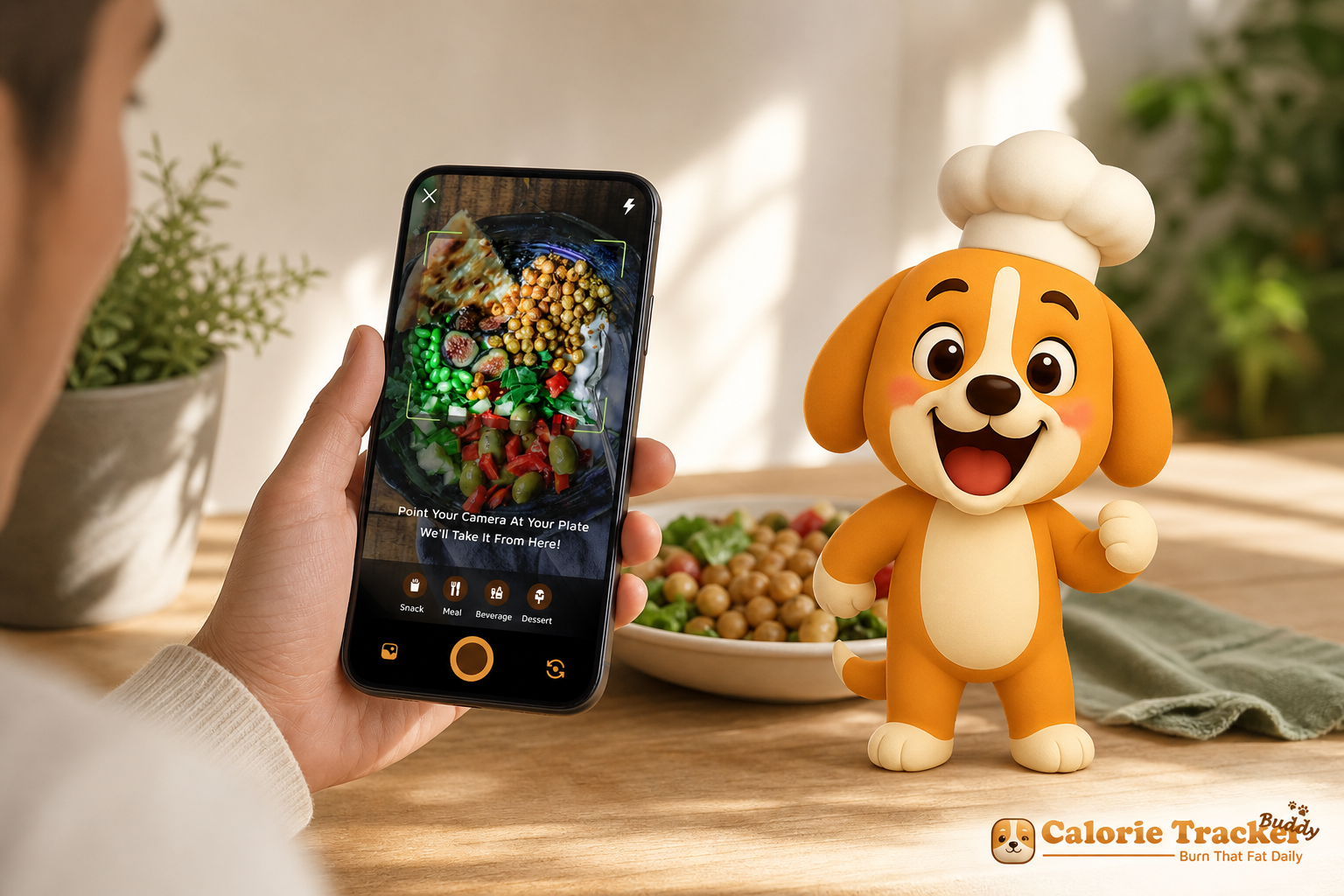
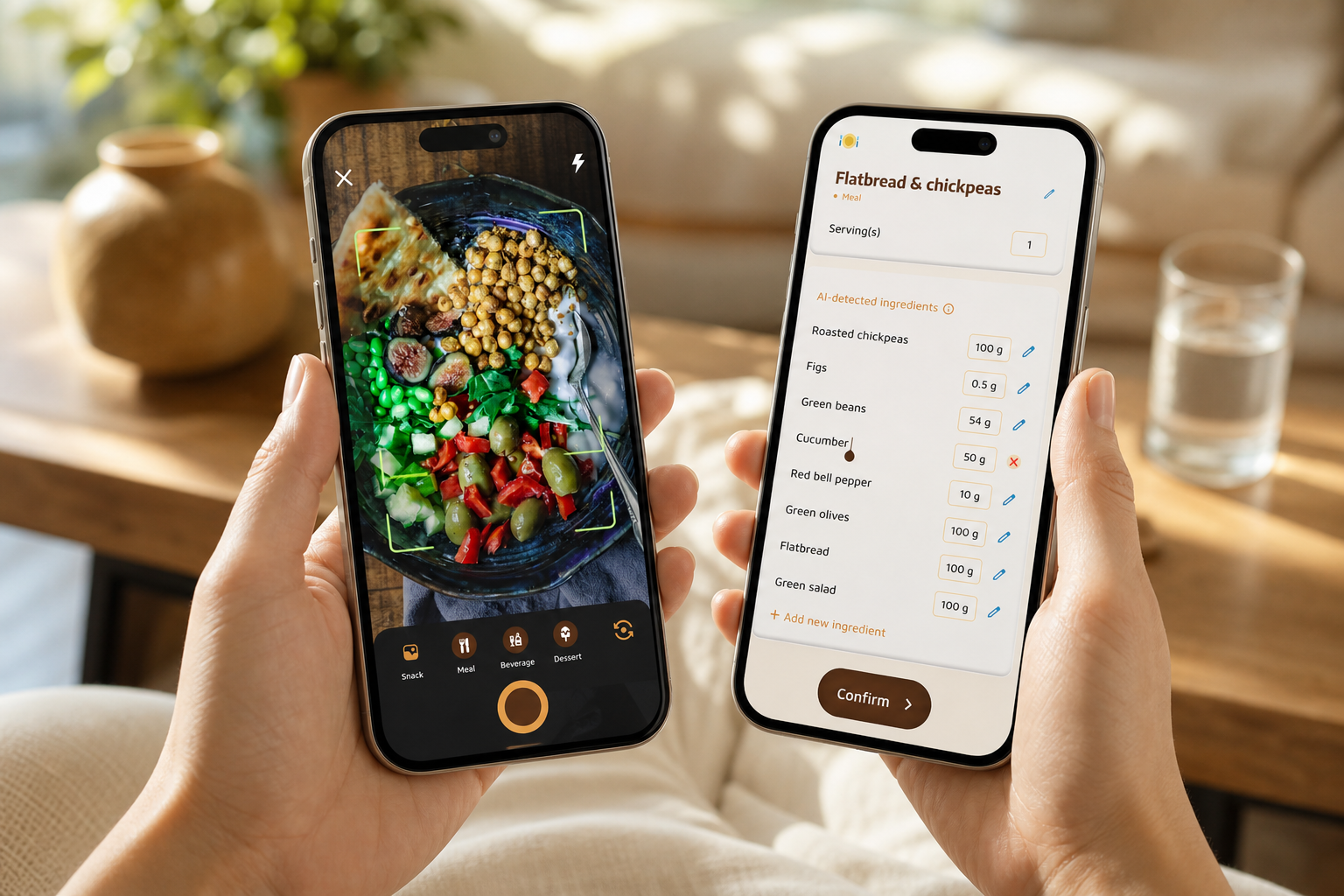
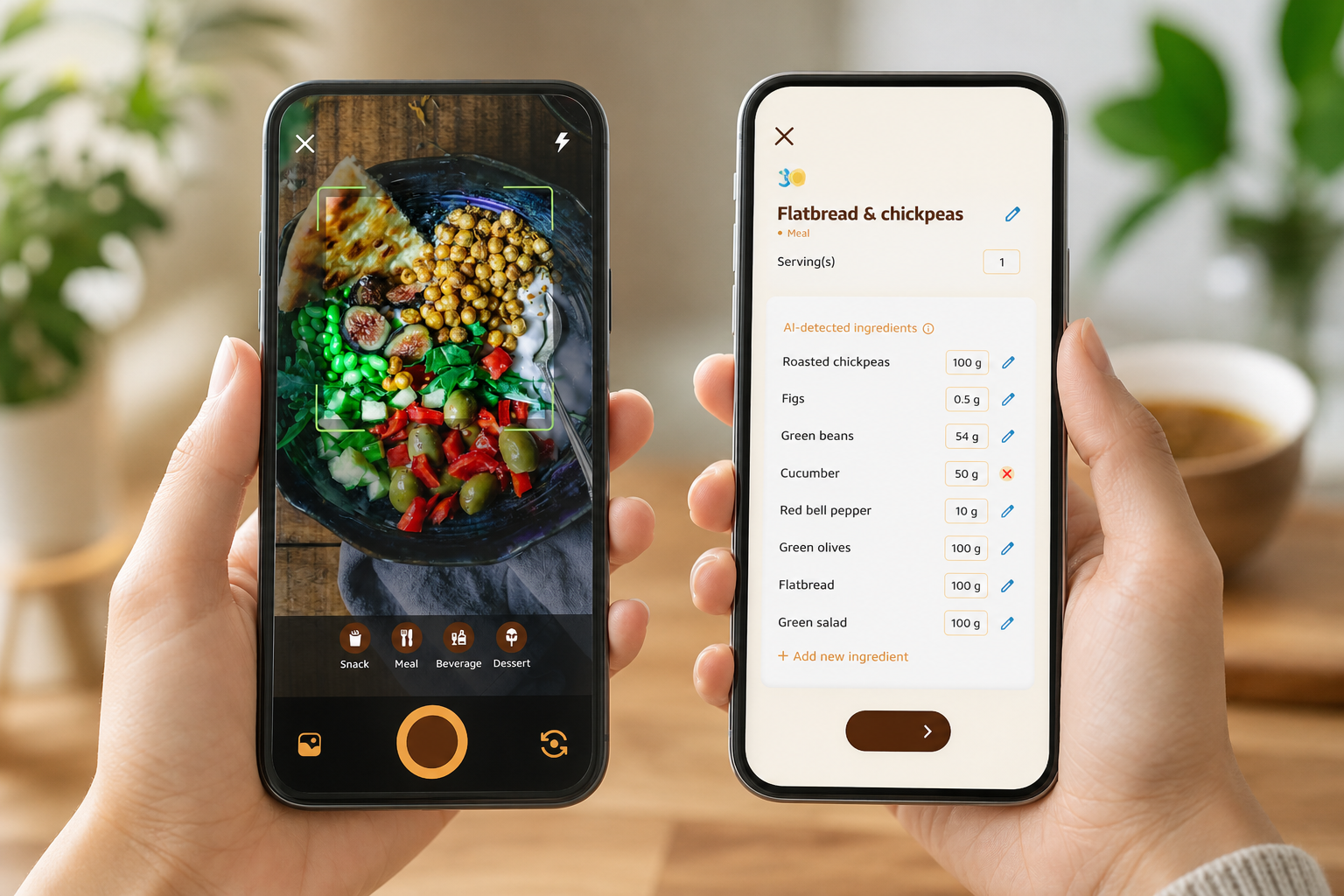
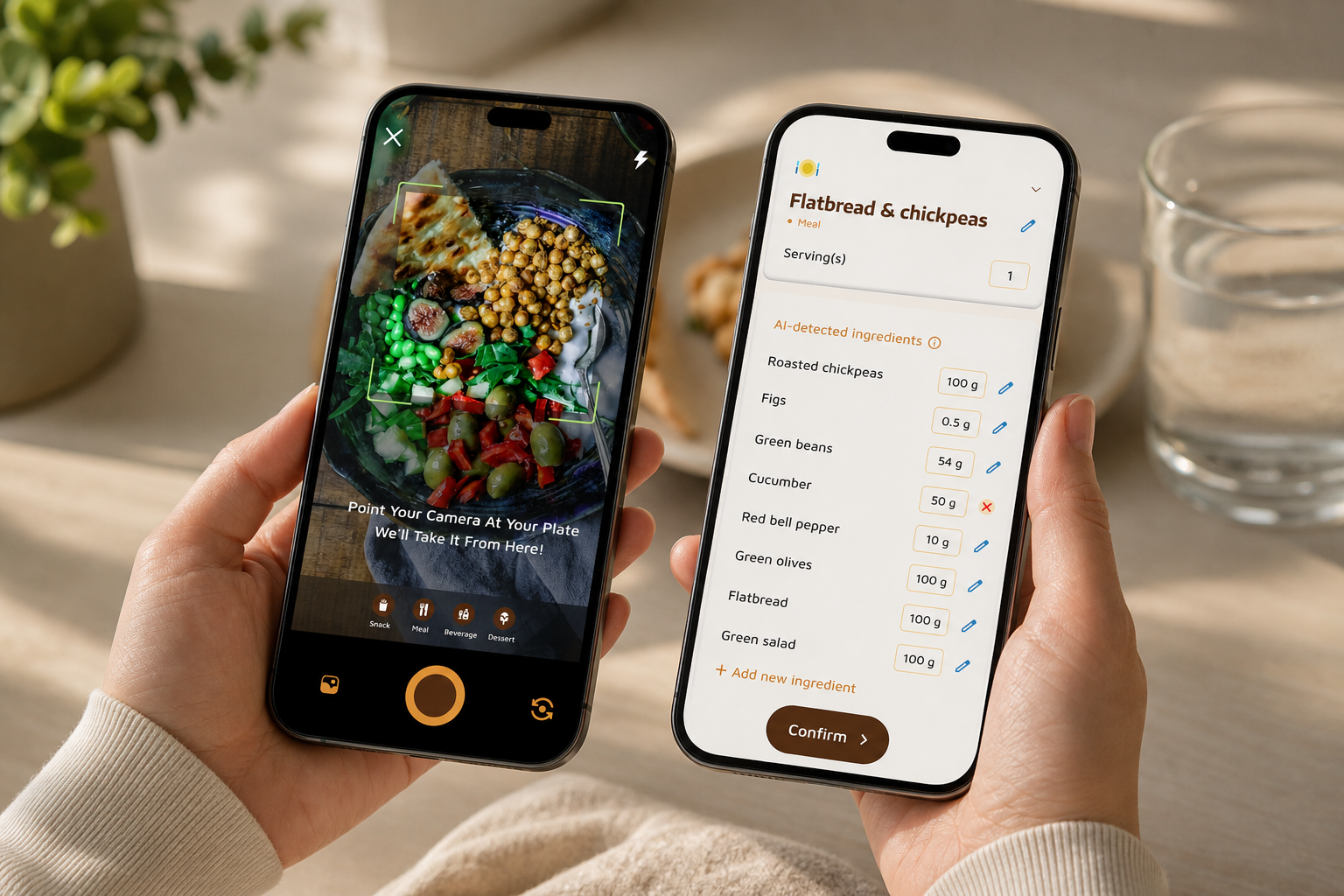
Photo-based meal tracking cuts friction. Snap your plate, and the app returns calories plus carbs, protein, and fat. You can then tweak portion sizes or swap items if the scan needs a correction. Over time, this real-time loop helps you spot portions by sight.
In addition, goal predictions show how each meal affects your daily target. If lunch was high-carb, you’ll see how a protein-forward dinner can bring the day back in line.
- Pro tips for better photo logs:
- Take photos in good light and include the full plate for best detection.
- Use the quick-portion slider to nudge sizes up or down rather than re-adding foods.
- Save common meals as “Favorites” for one-tap reuse on hectic days.
“I’ve tried tons of fitness apps, but this is, hands down, the best calorie tracker app I’ve ever used. Logging meals is fun now—just snap a photo and boom, done. And the little buddy? This is a total big improvement for staying motivated!” — Pooja Rao
Macros, Water, and Steps—Simple, Not Stressful
The app tracks calories and basic macros without burying you in charts. Water intake rolls toward a clear 2.5L/day target. Steps build toward 10,000/day, with progress rings and upbeat nudges. These visual cues tie straight into the buddy’s growth so every small win counts.
For busy or low-signal moments, offline logging lets you add meals or workouts and auto-syncs when you’re online again. Therefore, a late dinner doesn’t break your streak.
- How the simple dashboard helps:
- Color-coded rings make it obvious what to prioritize next.
- A single macro snapshot (carbs, protein, fat) prevents analysis paralysis.
- Contextual hints—“Protein is low today”—suggest one small, doable action.
Integrations and Personalization for Real Life
You can sync with Google Fit for automatic step updates. In addition, you can set dietary preferences and flag allergies during onboarding so the app tailors advice. If you want extra guidance, Fitness Coach mode adds tailored advice, custom challenges, and motivational support, like a coach in your pocket.
Compared to alternatives that feel clinical, this makes everyday tracking warmer and more forgiving. And that’s exactly what keeps you logging past week two.
- Wearable connectivity tips:
- Ensure your wearable is sharing data to Google Fit in its own app settings.
- Open Calorie Tracker Buddy once after pairing to trigger the first sync.
- If counts seem off, compare steps at midday to spot-sync issues early.
Privacy, Accessibility, and Data Controls
Your logs are personal.
- Clear privacy controls to toggle community sharing on or off at any time.
- Data export options if you want a copy of your history for a coach or clinician.
- Accessibility-minded design: high-contrast themes, large-text mode, and screen-reader labels for key buttons.
- Optional reminders that can be silenced during focus hours so nudges stay kind, not disruptive.
Also Read!
Calorie Tracker Buddy vs Lose It! for Weight Loss: Which Is Better for AI Photo Calorie Counting?
Calorie Tracker Buddy vs. Other Gamified Calorie Apps: An Honest Comparison
Below is a fair look at how Calorie Tracker Buddy stacks up against two well-known names in 2026. MyFitnessPal and Finch. The goal is not hype; it’s to show where each shines, and where a beginner who wants gamified calorie tracking with virtual pet support gets the most help.
| Feature | Calorie Tracker Buddy | MyFitnessPal | Finch |
|---|---|---|---|
| Virtual pet that grows with healthy choices | Yes | No | Yes (wellness focus) |
| Photo-based meal logging | Yes | Limited/No | No |
| Real-time feedback on meals and goals | Yes | Basic | Limited |
| Calories + basic macros | Yes | Yes | No calorie tracking |
| Google Fit syncing | Yes | Yes | No |
| Offline logging with auto-sync | Yes | Partial | No |
| Custom challenges and coach tools | Yes | Limited | Habit-based, not food |
| Community meal sharing | Yes | Yes | Wellness feed |
MyFitnessPal is the industry standard with a massive food database and strong brand recognition. If you need niche items matched fast, it excels. However, it lacks a virtual buddy or real gamification. For many beginners, the interface feels clinical, which can make daily logging feel like work.
Finch is a beloved virtual pet app for self-care and mental health habits. Its pet mechanic is charming and affirming. On the other hand, it doesn’t offer dedicated calorie tracking, photo-based meal logging, macro breakdowns, or syncing with fitness trackers for steps. It’s great for mood and routines, but not for food data and meal-by-meal guidance.
Calorie Tracker Buddy bridges both worlds, serious calorie tracking depth plus a buddy that reacts to your food, steps, and water. The result is structure when you need it and warmth when you waver.
“I’ve been using Calorie Tracker Buddy for five weeks, and I’ve already lost 4kg! It keeps me motivated with my little buddy cheering me on. I didn’t have to cut out my favorite foods—it’s about balance.” — Alex Sim
“Not only have I lost 5kg, but I also feel more energized. My health buddy is a constant source of encouragement, and the tips help me make smarter choices every day.” — Sandy T
- Who should choose which?
- Choose Calorie Tracker Buddy if you want photo logs, real-time coaching, and a responsive companion that celebrates balance.
- Choose MyFitnessPal if you’re an experienced tracker who needs the largest database and don’t mind a clinical interface.
- Choose Finch if you want a wellness buddy without calorie data, focusing more on mood and routines than meals.
“The pet makes me smile, the photo logging saves me time, and the nudges feel human. I finally kept a streak past 30 days.” — Priya K.
Get coach tools today → walks through a first log step by step.
Also Read!
How to Get Started with Calorie Tracker Buddy as a Complete Beginner
Starting should feel simple and kind. Here’s a 6-step path you can finish in under 10 minutes. This is the practical side of gamified calorie tracking with virtual pet support, fast setup with feedback you’ll want to return to tomorrow.
1.
Open the app and set dietary preferences and any allergies during onboarding. This tailors suggestions and flags common swaps you might like.
2.
You don’t need to calculate TDEE. Goal predictions inside the app estimate a smart starting point and adjust as your data grows.
3.
Take a photo of your breakfast. Review the auto-detected foods, adjust portions if needed, and save. You’ll see calories and macros in real time.
4.
Your buddy responds to consistency, not perfection. Each log, sip of water, and walk adds up. Watch it react to your day and level up as streaks build.
5.
Sync steps so your 10,000-step goal updates on its own. This gives a fuller picture of your day without extra taps.
6.
Make your first meal post. Say hello, ask a question, or follow a few peers. Light social ties boost accountability, which beginners value.
- Optional setup tips:
- Enable gentle reminders at times you usually eat or hydrate.
- Create one “go-to” balanced meal in Favorites for busy weekdays.
- Try a mini-challenge (e. g., “7 days of 2.5L water”) to build early momentum.
Pro tip: Use offline logging when you’re eating out and pressed for time. Log a quick photo or note, then let it auto-sync when you’re back online. The point of week one is learning, not perfection.
**“Download free on Android today →” is shown unless you explicitly share.
I’m vegetarian/vegan or have allergies. Will suggestions fit my diet?
Yes. During onboarding, set dietary preferences and add allergies so the app tailors swaps and tips (e. g., tofu or lentil-based proteins, dairy-free options). The buddy’s reactions focus on balance and consistency, not specific foods, so you get encouragement that fits your plate.
My hydration target isn’t 2.5L. Can I change it?
Absolutely. You can adjust your daily water target in settings based on your climate, activity level, and guidance from your healthcare professional. The default 2.5L is a friendly starting point; the buddy adapts to whatever target you set.
What if the photo scan guesses my meal wrong?
Use the quick-edit tools: tap to replace an item, slide portions up or down, or add a missing side. You can also save corrected meals as Favorites, so next time it’s a single tap. Over time the scanner adapts to your frequent foods, reducing edits.
Will the app work without internet access?
Yes. Offline logging lets you capture meals, water, and workouts without connectivity. When you reconnect, everything auto-syncs and your buddy updates. You’ll keep your streaks intact and see your rings catch up with a short delay.
Frequently Asked Questions
Does Calorie Tracker Buddy support iOS and Android?
The Android app is available now. iOS availability varies by region; check the site or your App Store for the latest release timeline. Feature parity is a priority so the same gamified calorie tracking with virtual pet experience carries across platforms.
How accurate is the photo-based calorie detection?
Photo estimates use computer vision plus a verified food database. It’s designed for quick logging, then refined by your edits. Accuracy improves as you correct frequent meals. For clinical precision, use a kitchen scale and adjust portions in-app.
Can I gain weight or maintain instead of losing?
Yes. Set your goal to “maintain” or “gain” and the coaching adjusts. Your buddy still celebrates balanced meals, sufficient protein, and consistent steps or strength sessions that support your target.
I have cultural dishes that aren’t in databases. What then?
Snap the meal as usual, then edit items or create a custom food with your own macros. Save it as a Favorite for one-tap reuse. You can also import recipes and the app will divide servings automatically.
What happens if I miss a day and lose my streak?
Streaks are encouragement, not punishment. If you miss a day, you’ll get a gentle reset plus a “bounce-back” mini-challenge. Your buddy might say, “New day, fresh start,” and you can rebuild momentum without shame.
Can I turn off social features and keep everything private?
Yes. Community is opt-in. You can disable sharing globally, keep your diary private, or share selected posts anonymously. Privacy toggles live in Settings → Privacy.
Is there a cost? What’s included for free?
Core logging (photos, macros, water, steps, Google Fit sync) is free. Premium adds Fitness Coach mode, custom challenges, advanced insights, and expanded data export. You can trial premium before subscribing.
Will reminders bother me?
Reminders are gentle and fully customizable. Set quiet hours, choose tones, and limit frequency. You can schedule “hydrate” nudges, pre-meal prompts, or step stretch reminders, or turn them off entirely.
How does the app handle accessibility?
High-contrast themes, large-text mode, color-blind safe palettes, and labeled UI elements support screen readers. Motion effects can be reduced. Feedback is welcome; accessibility is an ongoing focus.
Can kids or teens use the app?
The app is built for adults. If a teen wants to track nutrition, involve a parent or clinician and choose balanced, non-restrictive goals. The buddy’s tone is supportive, but medical guidance for minors is recommended.
Does it integrate with other fitness apps besides Google Fit?
Google Fit consolidation pulls data from many wearables on Android. If your device syncs to Fit, your steps appear in Calorie Tracker Buddy. Additional direct integrations roll out over time; check Settings → Integrations for the current list.
How do I contact support or report an issue?
Use Settings → Help & Support to chat or email. Include screenshots and your device model for faster fixes. There’s also a searchable Help Center with step-by-step guides.
The Bottom Line for 2026
- You’ll stick with tools that reward effort today, not just results later. A responsive buddy, simple photo logging, and real-time tips check that box.
- Clear daily targets—10,000 steps and 2.5L water—plus calories and basic macros keep goals concrete and doable.
- For beginners, Calorie Tracker Buddy blends serious tracking with warmth, bridging the gap between week two and day 66.
- Privacy, accessibility, and offline-friendly design make the habit easier to keep in real life, not just on perfect days.
**Download free on Android today →
Visit Calorie Tracker Buddy for more about Fitness Coach mode, custom challenges, and community support in 2026.