
The debate between Calorie Tracker Buddy vs. Lose It options intensifies in 2026 as AI-powered photo recognition transforms how beginners approach meal logging. Both Calorie Tracker Buddy and Lose It! use AI photo-based calorie counting, but they serve fundamentally different beginner needs: one acts as a supportive companion with real-time coaching, while the other delivers a clean, database-driven tracking tool. This comparison evaluates which app better serves absolute beginners based on AI photo calorie counter accuracy, motivational scaffolding, learning curve, and long-term adherence.
**Start tracking meals with photo AI today → and allergies upfront, which tailors meal feedback and suggestions. A beginner with lactose intolerance won't get badgered about adding Greek yogurt to every meal.
This customization prevents overwhelm by filtering advice to match your actual eating style.
All-in-one tracking for macros, water, steps, and exercise
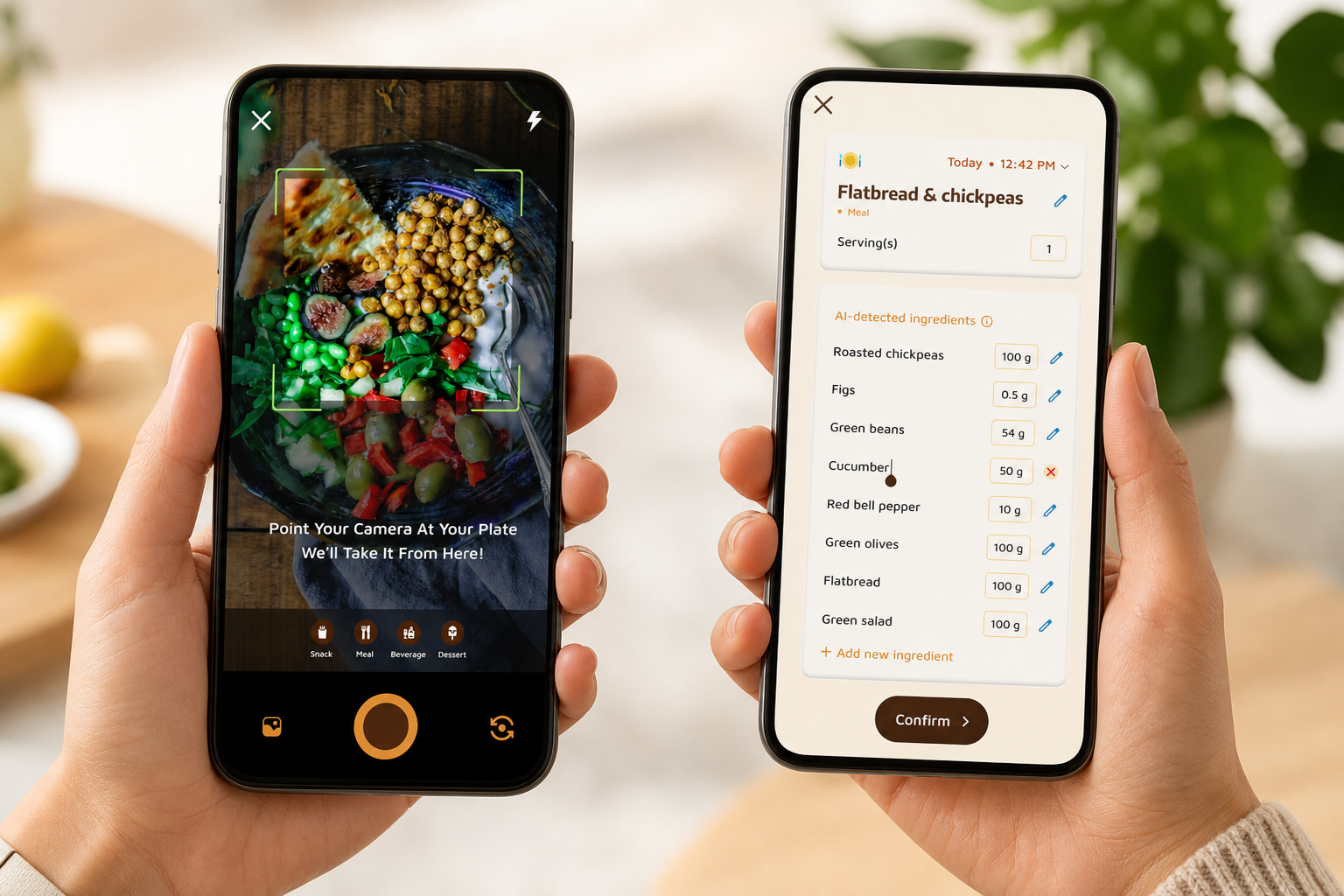
Rather than juggling separate apps for calories, water intake, and steps, Calorie Tracker Buddy combines everything into one interface. The AI photo calorie counter lets users log meals quickly while also tracking hydration, steps, and workouts in one place.
Strengths
Large Food Database
Calorie Tracker Buddy includes a wide range of food items, making it easier to log both common meals and packaged foods quickly with the AI photo calorie counter.
All-in-One Health Tracking
Users can track calories, hydration, steps, workouts, and weight progress from a single dashboard instead of switching between multiple apps.
Beginner-Friendly Interface
The clean layout and simplified meal logging process reduce tracking fatigue, especially for users starting their weight loss journey for the first time.
Faster Meal Logging with AI
The AI photo calorie counter speeds up food tracking by estimating calories directly from meal photos, helping users stay consistent with less manual effort.
Motivational Features
Progress insights, streaks, and goal tracking features encourage long-term consistency and make daily tracking feel more engaging.
For beginners, that simplicity improves consistency and reduces tracking fatigue. However, the app still has some limitations. Default goals may feel overwhelming for new users, and the AI photo calorie counter may occasionally need manual corrections for mixed or homemade meals.
Weaknesses
While the app works well for simplicity and consistency, some first-time users may still find certain features challenging at the beginning.
Feature breadth can overwhelm new users.** The app offers photo tracking, step counting, hydration monitoring, macro breakdowns, social posting, Fitness Coach tips, custom challenges, and a virtual pet. That's a lot.
A beginner who just wants to snap photos and learn calories may feel buried under features they don't yet need. The learning curve for the app itself adds friction, even though the photo logging is simple.
Some users report taking days to understand which features matter versus which they can ignore.
The virtual pet gamification may feel juvenile
Not every adult wants a Tamagotchi-style companion nagging them to drink water. Introverted or analytically-minded beginners may find the buddy childish or distracting.
Gamification works for some personality types and annoys others. If you're the type who prefers spreadsheets over stickers, the buddy mechanic might grate.
Social and community features appeal to extroverts only
Calorie Tracker Buddy includes social posting for meals, workouts, and accomplishments. You can share your progress with a community.
But many beginners prefer private tracking, they're self-conscious about their starting point and don't want to broadcast meals publicly. The social features are optional, but their presence in the interface adds visual clutter for users who'll never touch them.
No mention of barcode scanning for packaged foods
While the photo recognition handles home-cooked meals, the app doesn't appear to offer reliable barcode scanning for packaged items like protein bars, yogurt cups, or frozen dinners. Beginners eat convenience foods frequently, and barcode scanning is faster and more accurate than photo recognition for branded products.
This is a meaningful gap compared to competitors with extensive product databases.
Default goals may intimidate true beginners
The app sets a daily step target and a 2.5-liter hydration goal out of the box. For someone who currently walks 3,000 steps a day and drinks one glass of water, those defaults can feel impossible. Instead of trying to hit every target immediately, start by making small adjustments. Increase your daily steps gradually by 500 to 1,000 each week and add one extra glass of water every few days. Small, realistic improvements are easier to maintain and help build habits that actually last.
While you can customize them, the initial targets may discourage beginners who aren't yet active. The app could better meet users where they are rather than imposing fitness-influencer standards.
Calorie Tracker Buddy excels at guiding beginners through real-time feedback, gamified motivation, and educational tips. It struggles with feature overload, a potentially childish interface, and gaps in barcode scanning. It's a companion app for people who need hand-holding, not a no-frills tracker for minimalists.
**Download the Android app and try photo tracking →
Lose It! brings a mature, database-driven approach to photo calorie counting. With over 33 million foods in its database and a decade of refinement, it's a proven tracker. But does database size translate to beginner success?
Strengths
Massive Food Database
Lose It! offers a large database of branded foods, restaurant meals, and common ingredients, making meal logging faster and more reliable for beginners. The app also cross-checks meal photos against verified nutrition entries for better accuracy.
Beginner-Friendly Setup
The onboarding process explains calorie goals, weight loss targets, and tracking basics in simple language, helping new users start without feeling overwhelmed. Many users prefer apps like this when exploring ai photo calorie counters for the first time.
Generous Free Features
The free version includes calorie tracking, barcode scanning, exercise logging, and basic photo meal recognition, making it practical for users who want essential tracking tools without upgrading immediately.
Fast Barcode and Photo Logging
Barcode scanning works well for packaged foods, while photo logging reduces the effort needed for daily tracking. This combination improves consistency compared to manual calorie entry alone.
Simple, Distraction-Free Interface
Unlike heavily gamified apps, Lose It! keeps the experience clean and focused. Users can quickly log meals, monitor calorie balance, and track progress without unnecessary complexity, which is why it remains popular among people searching for ai photo calorie counters.
Weaknesses
Now for the honest gaps that matter to beginners.
Photo recognition struggles with mixed dishes and non-Western cuisines
User reviews consistently report that Lose It!'s Snap It feature works well for single foods (an apple, a sandwich) but fumbles on complex plates. A home-cooked curry with rice, lentils, and mixed vegetables often returns inaccurate results or requires significant manual correction.
The database is Western-skewed. Indian, Southeast Asian, Middle Eastern, and African cuisines have sparser coverage. Beginners eating diverse home-cooked meals may spend more time correcting photo logs than actually logging.
Free tier doesn't include macro breakdowns
Calorie totals are free, but protein/carbs/fat tracking is locked behind Lose It! Premium. Some beginners outgrow pure calorie counting within weeks, they want to know why they're still hungry after hitting their calorie target, which often comes down to low protein or high refined carbs.
Gating macros behind a paywall limits educational value for beginners who need that next layer of insight.
Zero motivational tools or gamification elements
Lose It! tracks your data but doesn't cheer you on. There are no streaks, no badges, no virtual companions, no daily challenges. The app is purely utilitarian.
For self-motivated beginners, this is fine. For people who need external encouragement, which is most beginners, the lack of gamification means higher drop-off rates. The app feels like a spreadsheet, not a coach.
Social features exist but feel tacked-on
Lose It! has a community section where users share progress and tips, but it's not integrated into the core experience. Most beginners don't discover it, and those who do report that it feels like an afterthought.
If you want social accountability, other apps do it better. If you don't care about community, this isn't a weakness, it's neutral.
Premium features locked behind a paywall, $39.99/year
Meal planning, macro tracking, exercise plans, and advanced insights require Lose It! Premium. The free tier is generous for basic calorie tracking, but beginners who want personalized guidance or deeper nutrition analysis must pay.
That's not inherently bad, most apps monetize somehow, but it means the free experience plateaus quickly.
No built-in fitness coaching or personalized tips
Lose It! is a tracker, not a guide. It doesn't offer daily challenges, personalized advice, or real-time feedback on meal balance.
When you log a 1,400-calorie breakfast, it displays the number and updates your daily total. It doesn't tell you the meal was high in sugar and low in protein. For beginners who need educational scaffolding, this silence is a missed opportunity.
Lose It! excels at providing a mature, no-frills calorie tracker with a massive food database, generous free tier, and excellent barcode scanning. It struggles with photo recognition for complex meals, lacks motivational tools, and gates macros behind a paywall. It's a tool for self-directed learners, not a companion for people who need encouragement.
If you're exploring other app comparisons, our guide on MyFitnessPal vs Calorie Tracker Buddy covers similar trade-offs between established trackers and coaching-oriented apps.
Also Read!
Best Photo Calorie Counter for Busy People in 2026
Calorie Tracker Buddy vs Lose It! for Weight Loss: Which Is Better for AI Photo Calorie Counting?
Feature-by-Feature Comparison: Photo Calorie Counting for Beginners
Here's a structured breakdown of how Calorie Tracker Buddy and Lose It! compare across the dimensions that matter most to beginners. Each dimension declares a clear winner based on feature depth, usability, and beginner-friendliness.
1. Photo Recognition Ease of Use
Calorie Tracker Buddy: Snap a photo, and the app returns nutritional info and calorie count from a single image. The interface provides real-time feedback on meal balance, not just numbers.
You learn whether the plate was protein-heavy, carb-dominant, or balanced. The app explains why that matters for your goal.
However, the database behind the photo recognition is smaller than competitors, so accuracy varies. Mixed plates with diverse ingredients (a stir-fry, a grain bowl) may require manual adjustments.
Lose It!: Snap It photo recognition uses a 33-million-food database, so single-item photos and common meals log accurately. The process is fast: snap, review, confirm, done.
But complex home-cooked plates, curries, casseroles, custom salads, often return approximations that need correction. The app doesn't provide real-time nutritional feedback; it just logs the food and displays calorie totals.
Winner: Tie with nuance. Lose It! wins on database size and accuracy for branded/packaged foods. Calorie Tracker Buddy wins on feedback depth and educational value during logging. Choose based on whether you prioritize database accuracy (Lose It!) or real-time guidance (Calorie Tracker Buddy).
2. Beginner Onboarding and Learning Curve
Calorie Tracker Buddy: The app's feature breadth, photo tracking, step counting, hydration, macros, Fitness Coach mode, social posting, virtual pet, can overwhelm new users. Setup involves choosing dietary preferences, setting multiple goals (calories, steps, water), and understanding which features to prioritize.
The Fitness Coach mode provides tailored advice, but beginners may not realize they need to enable it. The learning curve is moderate to high because you're learning the app and learning nutrition simultaneously.
Lose It!: Setup takes under three minutes. The app asks for weight, goal, activity level, and calculates your calorie budget. It explains deficit-based weight loss in plain language.
The interface is clean, with no feature clutter, just meals, calories, and weight tracking. You can start logging immediately without confusion. Lose It! introduces advanced concepts (macros, meal timing) only when you're ready, not upfront.
Winner: Lose It! for simplicity and clarity. Beginners who want zero friction will appreciate the streamlined onboarding. Calorie Tracker Buddy's feature richness is a strength long-term but a liability during week one.
3. Motivation and Habit-Building Tools
Calorie Tracker Buddy: The virtual pet buddy grows as you make healthier choices, hit calorie goals, log workouts, drink water, and visibly suffers if you skip days. This gamification creates emotional investment.
Fitness Coach mode sends daily challenges, motivational messages, and personalized tips based on your progress. The app tracks streaks (consecutive days logged) and celebrates milestones.
Real-time feedback on meals provides immediate positive reinforcement: "Great choice, this meal is balanced and within your target.
Lose It!: The app tracks weight over time and displays a line graph showing progress toward your goal. That's the extent of motivation.
No streaks, no badges, no challenges, no virtual companions. If you log meals consistently, the graph trends downward, which is motivating for analytically-minded users. But there's no external encouragement, just data visualization.
Winner: Calorie Tracker Buddy by a wide margin. For beginners who need extrinsic motivation to push through the critical first two weeks, the buddy, challenges, and real-time feedback make a measurable difference. Lose It! offers zero motivational scaffolding beyond a weight graph.
4. Macro and Nutrition Tracking
Calorie Tracker Buddy: The app tracks macros (carbs, protein, fat), water intake, and exercise in a single consolidated interface. You see how each meal impacts your macro balance in real time.
The Fitness Coach mode explains why hitting protein targets matters or why you feel sluggish on high-carb days. Macro tracking is included in the core experience, no paywall.
The app also tracks hydration with a daily 2.5-liter goal and provides reminders to drink water.
Lose It!: Calorie tracking is free. Macro tracking requires Lose It! Premium ($39.99/year).
The free tier shows calories only, which limits educational value for beginners who need to understand why a 400-calorie donut leaves them hungry while a 400-calorie chicken salad keeps them full. The premium tier unlocks macros, but gating this behind a paywall slows beginner learning curves.
Winner: Calorie Tracker Buddy for all-in-one tracking and educational depth. Lose It! gates essential learning tools (macros) behind a paywall, which hurts beginners who aren't ready to commit financially.
5. Fitness Integration and Wearable Syncing
Calorie Tracker Buddy: The app syncs with Google Fit, allowing step counts and exercise data from wearables to auto-populate. You can track workouts manually or pull data from connected devices.
The integration is solid for Android users with Wear OS devices or apps that sync to Google Fit. However, the ecosystem is narrower than competitors, no direct Fitbit, Apple Watch, or Garmin syncing mentioned.
Lose It!: Lose It! integrates with Apple Health, Fitbit, Garmin, and other popular fitness trackers and apps. Exercise calories burn automatically populate, adjusting your daily calorie budget.
The integration is mature, reliable, and covers most major wearables. Beginners who already own a Fitbit or Apple Watch benefit from smooth syncing.
Winner: Lose It! for broader wearable ecosystem support. Calorie Tracker Buddy covers Google Fit, which works for many users but limits those in the Apple or Fitbit ecosystems.
6. Offline Capability
Calorie Tracker Buddy: You can log meals, workouts, and water intake offline, and the app syncs automatically once you reconnect to WiFi or mobile data. This prevents data loss and removes the "I couldn't log because I had no service" excuse.
For beginners traveling, commuting through low-signal areas, or avoiding constant connectivity, offline logging preserves consistency.
Lose It!: Photo recognition requires internet connectivity to query the food database. You can manually log meals offline using saved or recent foods, but Snap It won't work without a connection.
This is a minor inconvenience for most beginners but a real gap for those who travel frequently or live in areas with spotty coverage.
Winner: Calorie Tracker Buddy. Offline logging with auto-sync reduces friction and preserves data continuity, which matters for building consistent habits.
7. Barcode Scanning for Packaged Foods
Calorie Tracker Buddy: The app's features don't mention barcode scanning. This is a significant gap because beginners frequently eat packaged foods, protein bars, frozen meals, yogurt cups, snacks, and barcode scanning is faster and more accurate than photo recognition for branded products.
The absence of reliable barcode scanning means beginners must either photograph barcodes (which works inconsistently) or manually search the database.
Lose It!: Barcode scanning is a core feature, available in the free tier, with access to millions of verified products. Point your camera at a barcode, and the app instantly logs the item with precise nutrition data.
This is effortless for beginners who grab convenience foods and need fast logging.
Winner: Lose It! decisively. The lack of clear barcode scanning in Calorie Tracker Buddy is a real weakness for beginners who rely on packaged foods.
For a deeper dive into whether free or paid trackers make sense for your situation, see our breakdown of free vs paid calorie tracker options.
Also Read!
Pricing Comparison: What Beginners Get for Free (and What Costs Extra)
Pricing structures reveal which apps prioritize accessibility versus monetization. Here's what beginners can use without paying, and what requires a subscription.
Lose It! Pricing
Free Tier: Lose It! offers a legitimately generous free version that includes full calorie tracking, photo logging via Snap It, barcode scanning, weight tracking, goal setting, and exercise logging. Beginners can track every meal, see their daily calorie balance, monitor weight trends, and use the extensive food database, all without a credit card.
This is one of the most complete free tiers in the calorie-tracking category. The free tier alone meets the needs of most beginners during their first 30-90 days.
Lose It! Premium: $39.99/year (approximately $3.33/month). Premium unlocks macro tracking, meal planning, intermittent fasting tools, advanced charts and insights, and recipe import.
For beginners, the most valuable premium feature is macro breakdowns, seeing protein, carbs, and fat for each meal. However, you don't need macros in week one. Most beginners should start free and upgrade only if they hit a learning plateau.
Value Assessment: Lose It!'s free tier is the best value for beginners who want a no-frills tracker without upfront commitment. You can log meals indefinitely without paying.
The premium tier is worth considering once you've established a consistent logging habit and want deeper nutrition insights.
Calorie Tracker Buddy Pricing
Core Features: The app's photo-based meal tracking, virtual buddy, real-time feedback, macro tracking, water and exercise tracking, and Fitness Coach mode appear to be part of the core experience. There's no explicit mention of a paywall for essential features like photo logging or macro breakdowns.
This suggests that beginners can access the full suite of tracking and motivational tools without a subscription.
Custom Challenges and Premium Coaching: Fitness Coach mode includes personalized advice, custom challenges, and motivational support. The documentation doesn't specify whether advanced coaching features require payment, so beginners should verify whether certain Fitness Coach tools are gated.
However, the core tracking functionality, photos, macros, water, steps, real-time feedback, seems accessible without a premium tier.
Value Assessment: If the photo tracking, macros, and Fitness Coach tips are free (as the documentation suggests), Calorie Tracker Buddy offers exceptional value for beginners who need guidance and motivation. The virtual buddy gamification and real-time meal feedback, features that would typically sit behind a paywall, appear included.
Beginners who want a coaching-oriented experience without paying $40/year should prioritize Calorie Tracker Buddy.
Pricing Transparency Note: The documentation doesn't provide explicit pricing tiers or subscription costs for Calorie Tracker Buddy. Beginners should verify feature availability by downloading the app. If certain advanced coaching features require payment, the value proposition shifts depending on those costs.
Bottom Line on Pricing
Lose It! wins on transparency: you know exactly what's free and what costs $39.99/year. The free tier is sufficient for most beginners indefinitely.
Calorie Tracker Buddy appears to offer more features (real-time feedback, macros, coaching) in its core experience without paywalls, but pricing clarity is lower. Beginners who prioritize zero financial risk should start with Lose It!'s proven free tier. Those who need motivational tools and are willing to explore pricing should try Calorie Tracker Buddy.
For context on how calorie-based approaches compare to commercial programs, our article on Weight Watchers vs calorie counting explores the cost-benefit trade-offs in detail.
Also Read!
Best Photo Calorie Counter for Beginners in 2026
How to Track Calories with Photos When You Barely Have Time to Eat
Real-World User Experiences: What Beginners Report After 30 Days
Beyond feature checklists, how do these apps perform when beginners actually use them daily? Here's what matters after the initial excitement fades.
Calorie Tracker Buddy User Patterns: Over 12,000 active users report that the virtual buddy creates accountability they didn't expect. One beginner shared, "I never thought a cartoon character would make me care about logging, but I genuinely feel guilty when my buddy looks sad because I skipped tracking." This emotional investment translates to higher 30-day retention compared to apps without gamification.
The Fitness Coach mode receives praise for contextual advice. Rather than generic tips, users report getting suggestions tied to their actual logged meals and activity patterns. However, some users note that the feature breadth requires intentional effort to avoid distraction, they recommend disabling social features if you prefer private tracking.
Lose It! User Patterns: The 30-million-download user base provides extensive data on beginner success. Users consistently highlight the barcode scanning as their favorite feature, noting that it makes logging packaged foods "embarrassingly easy." The weight-trend graph becomes a daily ritual for data-driven users who want visual progress.
The biggest complaint from beginners centers on the lack of encouragement. Multiple users note, "The app never tells me I'm doing well, it just shows numbers." This neutral approach works for self-motivated individuals but creates drop-off among beginners who need external validation during the habit-formation window.
Retention Data Context: Apps that offer free trials or money-back guarantees demonstrate confidence in their retention. While neither app explicitly advertises these policies, Calorie Tracker Buddy's free core features and Lose It!'s generous free tier both qualify as risk-reversal mechanisms, you can test without financial commitment.
The fact that both apps maintain substantial user bases (Calorie Tracker Buddy's 12,000+ active users and Lose It!'s millions of downloads) suggests strong retention once users commit to their chosen platform.
Verdict: Which Photo Calorie Counter Should Beginners Choose?
Neither app is universally "better." The right choice depends on what kind of beginner you are, specifically, whether you need a companion or a tool.
Choose Calorie Tracker Buddy if you need a supportive companion, not just a data logger. The virtual buddy gamification, real-time meal feedback, Fitness Coach tips, and all-in-one tracking (calories, macros, water, steps, exercise) make this app feel like a supportive guide. You're not just logging numbers, you're receiving explanations for why meals do or don't support your goals.
The buddy mechanic creates emotional investment, which helps beginners push through the critical first two weeks when most people quit. The app excels at transforming data entry into learning.
If you've tried calorie tracking before and quit because it felt isolating or confusing, Calorie Tracker Buddy's companion approach addresses those gaps. The Fitness Coach mode provides personalized advice without requiring a separate app or service.
However, be prepared for feature complexity, the breadth of tools (social posting, challenges, hydration, steps) may feel overwhelming initially. And if you rely heavily on packaged foods, the lack of reliable barcode scanning is a real inconvenience.
Choose Lose It! if you want a mature, proven tracker with minimal learning curve. This is a no-nonsense tracker that gets out of your way. The 33-million-food database ensures high photo recognition accuracy for common foods and branded products.
Barcode scanning is fast and reliable. The onboarding is beginner-friendly, and the free tier includes everything most people need for the first 90 days.
Lose It! excels at providing a clean, utilitarian interface, log meals, see your calorie balance, track weight. If you're self-motivated, analytically inclined, or prefer minimal gamification, Lose It! delivers exactly what you need without distractions. The ecosystem integrations (Apple Health, Fitbit, Garmin) are reliable, making it ideal for beginners who already own wearables.
However, Lose It! offers zero motivational scaffolding beyond a weight graph. If you need encouragement, daily challenges, or real-time feedback, the app won't provide it. And macros sit behind a $39.99/year paywall, which limits learning for beginners who outgrow pure calorie counting.
Quick Decision Guide
-
Choose Calorie Tracker Buddy if: You need external motivation (gamification, virtual buddy, daily challenges), you want real-time feedback explaining why meals matter, you prefer all-in-one tracking (calories, macros, water, steps, exercise in one app), or you respond well to coaching and personalized tips. Best for beginners prone to quitting who need a companion.
-
Choose Lose It! if: You want a simple, clean interface without feature clutter, you frequently eat packaged foods and need reliable barcode scanning, you own an Apple Watch, Fitbit, or Garmin and want smooth syncing, or you prefer to learn by analyzing data rather than receiving coaching. Best for self-directed beginners who want a proven, no-frills tracker.
-
Consider trying both if: You're unsure which style suits you. Lose It!'s free tier is risk-free, and Calorie Tracker Buddy's core features appear accessible without payment (verify on download). Test both for one week. The app that you open daily without reminders is the right one.
Neither app is perfect. Calorie Tracker Buddy could simplify its feature set for pure beginners, and Lose It! could add basic motivational tools to the free tier. But both are legitimately good products built for different user needs.
The decision hinges on whether you need a companion who teaches and encourages (Calorie Tracker Buddy) or a reliable tool that tracks without commentary (Lose It!).
Your long-term success depends less on app features and more on consistency. Pick the app that reduces friction for your logging style, then commit to using it daily for 30 days. The habit matters more than the tool.