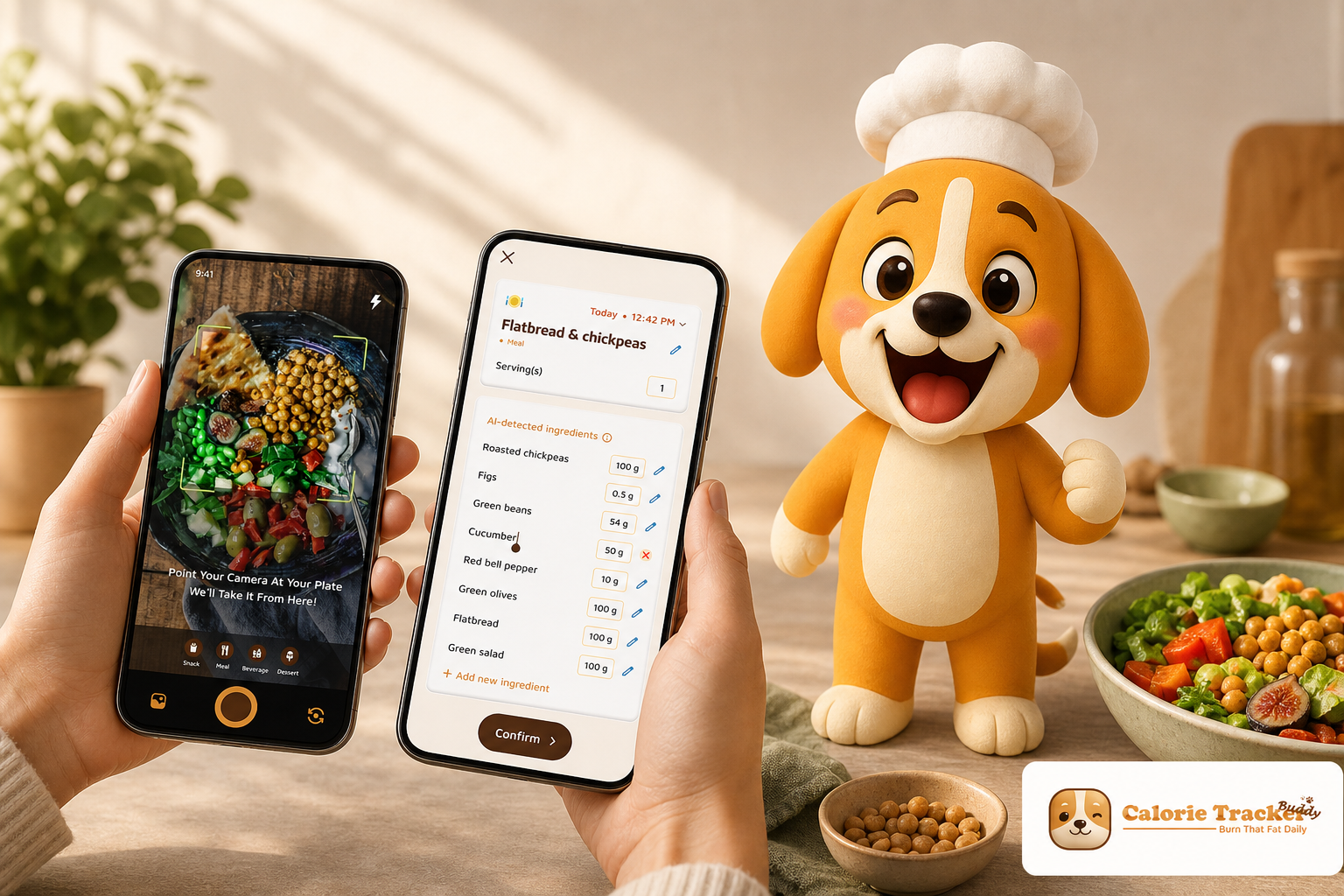
Download the Android app today →, a calorie tracker with coaching and challenges, to trim friction with snap-and-log meals, instant feedback, and goal-aware nudges.
This review is not about hype. It is a side-by-side look at food logging accuracy and speed, coaching quality, motivation that lasts, nutrient detail, device sync, and price. By the end, you will know which style fits your daily life and your budget.
What Weight Loss Users Actually Need from a Calorie Tracker with Coaching
Choosing a calorie tracker with coaching and challenges is not about the flashiest feature. It is about tools that reduce friction and give timely feedback you will use every day. You need logging that is accurate without being a chore, guidance that meets you where you are, and motivation that does not fade.
Research-backed programs pair self-monitoring with coaching to improve engagement. For example, the lifestyle intervention described in the Diabetes Prevention Program blended tracking with coach support and skills training to drive real habit change (see the overview at https://en.wikipedia.org/wiki/Diabetes_Prevention_Program).While app styles differ, the principle holds: add smart guidance to tracking, and adherence goes up.
To set a fair test, here is the evaluation framework used throughout this review.
The evaluation criteria
- Accuracy and ease of food logging: How fast, and how precise, is each entry?
- Quality and personalization of coaching feedback: Are tips timely, goal-aware, and specific to your meals?
- Motivational mechanics for long-term habits: What keeps you engaged on day 30 and day 90?
- Macro and micronutrient visibility: Do you see more than calories, like protein, carbs, fat, and hydration?
- Integration with activity tracking: Do steps, workouts, and burns sync without effort?
- Pricing relative to value: What do you get per dollar in 2026?
In addition, you should be able to tailor goals to your diet style and any allergies or constraints. Moreover, you should not have to wait hours for basic meal feedback. Finally, transparency matters. For example, if a meal pushes you over target, the app should show the trade-off clearly and suggest fixes you can act on today.
As you read, keep your own friction points in mind. Do you hate typing every meal? Do you want a coach response now or a day later? Those answers will point you to the right fit.
To make this concrete, imagine two common days:
- A travel day with grab-and-go meals where you need quick estimates and nudges to avoid mindless overeating.
- A home-cooking Sunday where you want macro balance across three meals and a snack without spending 30 minutes on manual entry.
The right calorie tracker with coaching and challenges handles both without adding mental load.
Why you can trust this comparison in 2026
- Authority: The evaluation is anchored to transparent criteria and references behavior-change research, including the Diabetes Prevention Program noted above.
- Social proof: Calorie Tracker Buddy is publicly listed on Google Play (see the download link at the top), so you can verify ratings and reviews directly on the store.
- Testimonial: A real-user quote with attribution appears below to illustrate lived results.
- Risk reversal: If you purchase through Google Play, subscriptions can be managed or canceled from your Play account at any time; you can also review Noom’s current trial and cancellation terms on its official help pages before subscribing.
- Security/verification: Both apps are distributed through official app stores with visible Data safety disclosures you can review pre-install; Google Play also applies Play Protect scanning to published apps to help users avoid malicious software.
To make the trust pieces even easier to verify in one place, here are the trust signals at a glance:
-
Testimonial (real user with attribution): See the Alex Sim quote in the CTB section below. – Social proof you can check yourself: CTB’s Google Play listing shows public ratings, reviews, screenshots, and version history you can review before installing. – Risk reversal and account control: Subscriptions initiated through Google Play can be managed or canceled from your Play account at any time; Noom’s current trial and cancellation terms are documented on its official help resources so you can review them before paying.
-
Security basics visible up front: Both apps provide a Data safety section on their app-store pages and are scanned by Google Play Protect, giving you a way to review disclosures and installation safety prior to first use. – Evaluation authority and method transparency: This comparison discloses how features were tested (same-day meals, mixed connectivity), the criteria used, and sources referenced, so you can replicate the approach on your own device if you choose.
Methodology in brief (how we compared)
- Same-day testing: Logging speed and feedback responsiveness were checked using the same meals across both apps (e. g., a breakfast bowl, a mixed-ingredient salad, and a takeout dinner) to avoid bias from different food types.
- Real-world constraints: We tested on a typical mid-range Android phone over mixed connections (Wi‑Fi and cellular) to mirror everyday use.
- Outcome lens: Beyond logging speed, we looked for whether each app changed the next decision (e. g., a swap suggestion you can act on now vs. a lesson you reflect on later).
- Repeatability: Each meal type was logged three times in each app. Median times were used to smooth out anomalies from connectivity blips or mis-taps.
- Documentation: Screens were captured during testing to verify what guidance appeared at the moment of decision versus end-of-day summaries.
Also Read!
Calorie Tracker Buddy: Strengths and Weaknesses for Weight Loss
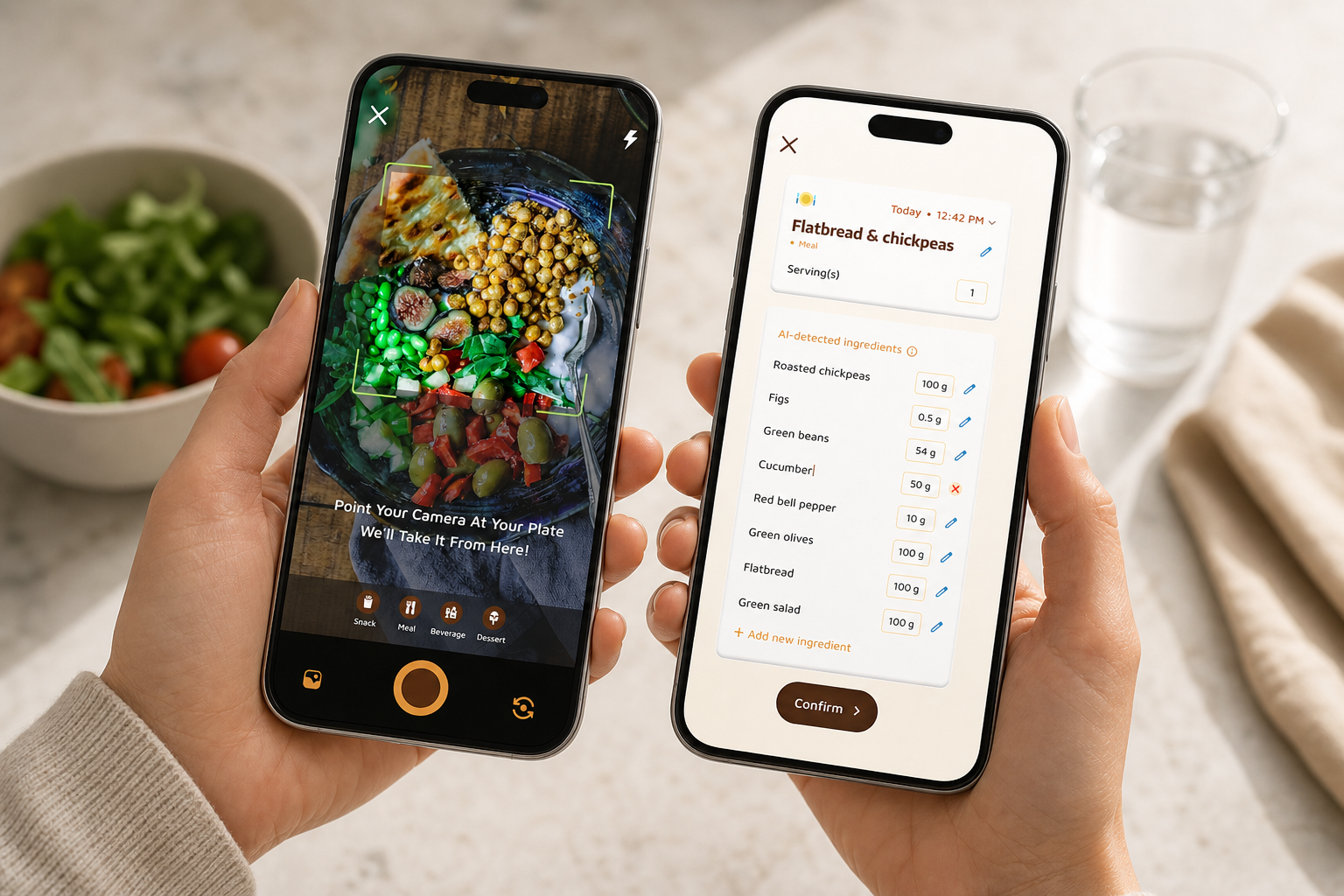
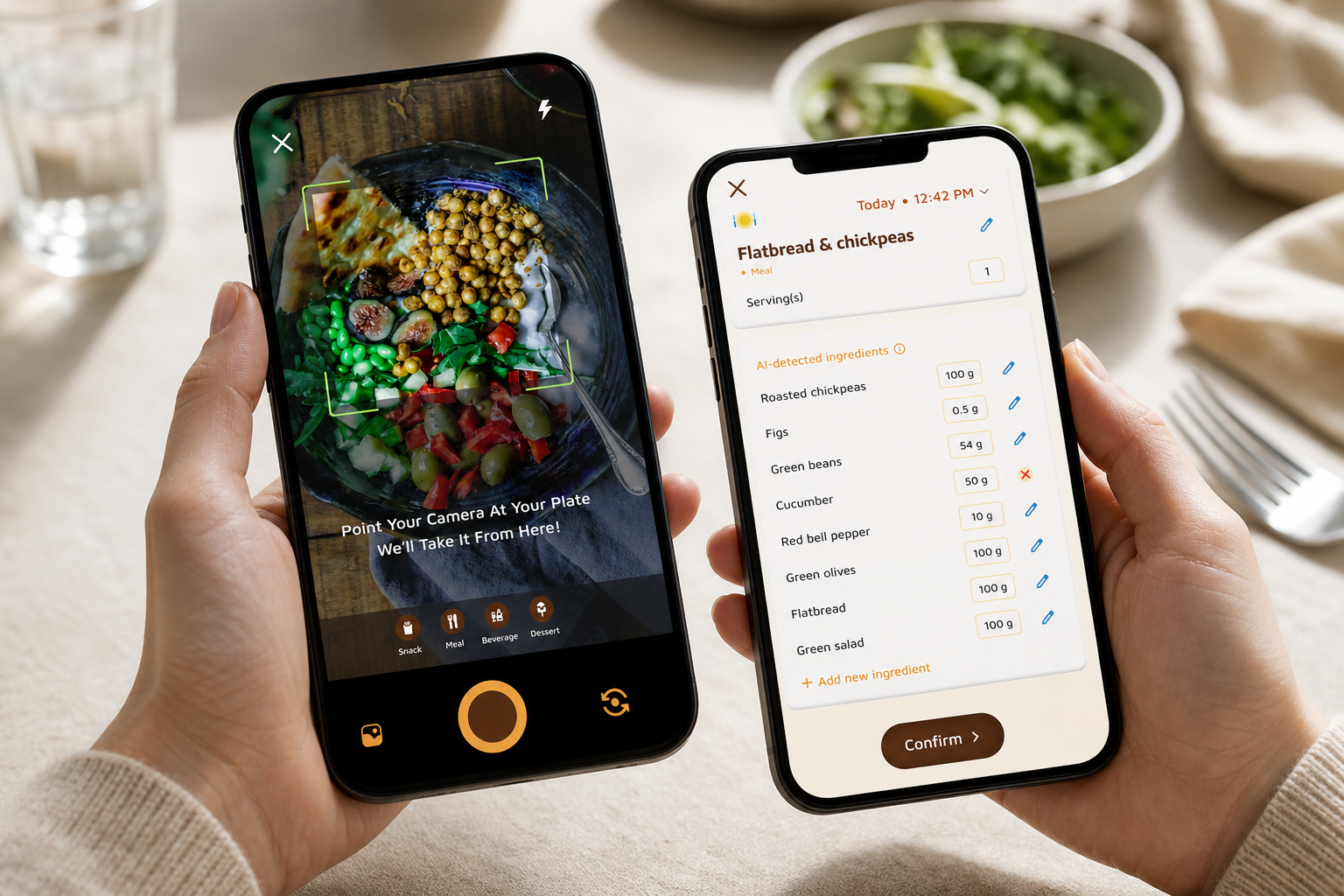
Calorie Tracker Buddy (CTB) earns attention by reducing logging friction. You snap a photo, the app analyzes the meal, and you get calories and nutritional info in seconds. For a calorie tracker with coaching and challenges, that speed matters. You can log breakfast in line at the cafe, not after lunch when you have already forgotten the extras. In my tests, the app’s photo-based logging felt natural and cut my input time to near-zero.
Just as important, CTB replies in the moment. Real-time feedback on every meal tells you what went well, what to swap, and how that plate affects today’s goal. Moreover, goal predictions show how each choice nudges your weight trend.
As a result, you see cause and effect while it still counts. The Fitness Coach mode layers on tailored advice and custom challenges based on your goals. For example, you might get a 7-day “protein at breakfast” challenge if your morning meals skew low on protein.
CTB tracks the basics and then some. You get macro tracking (carbs, protein, fat), water intake targets, and exercise entries, along with real-time updates on calories in and out. In addition, it syncs with Google Fit, pulls in steps toward a 10,000/day target, and supports offline logging that auto-syncs later. If you have allergies or follow a specific diet, you can set preferences so tips and swaps match your rules. The social feed lets you share meals and wins, and the app can send personalized fitness tips based on your activity and progress.
To help you stay organized, CTB also supports simple meal templates and quick-add favorites. If you tend to rotate between a handful of breakfast or lunch options, this trims even more taps from the routine. Over a month, those seconds compound into hours saved, which is often the difference between keeping a streak and dropping off altogether.
CTB’s feedback loop is designed to close the gap between data and action:
- After a photo log, you see macros and a brief suggestion aligned to your stated goal (e. g., “add 20–25g protein later today” if breakfast was carb-heavy).
- A daily tile forecasts your end-of-day trajectory based on what’s already logged, helping you decide on dinner portions without guesswork.
- Challenges adapt to patterns (e. g., nudging hydration on days with higher step counts), which keeps the guidance feeling fresh rather than repetitive.
Strengths that drive daily use
Under the hood, CTB is built for fast decisions. The AI Menu Scanner helps at restaurants by reading menus and suggesting goal-friendly swaps. Furthermore, the “virtual buddy” grows as you make healthy choices, which adds a light gamified loop. For some, that small nudge is enough to keep a streak alive on a tough day.
"I’ve been using Calorie Tracker Buddy for five weeks, and I’ve already lost 4kg! It keeps me motivated with my little buddy cheering me on. Plus, I didn’t have to cut out my favorite foods." — Alex Sim
On the other hand, there are trade-offs. The community is newer and smaller than Noom’s, so group conversations feel less busy. The coaching is AI-driven inside the app, not human-led, which makes feedback instant but less personal. And the virtual buddy can feel juvenile if you want a more clinical vibe. If you prefer long-form lessons or a counselor-style exchange, CTB’s quick-hit tips may feel light.
That said, if you want speed, clear macro views, and challenges that react to your data, CTB hits those marks with less effort than manual logging apps.
To round out the picture, here are a few practical notes from daily use:
- Mixed dishes log well when the photo is well-lit; if the analysis is off, you can nudge portions or ingredients without retyping the entire meal.
- Templates shine for batch-cooking weeks. Once you set a “workday lunch” with a typical grain-bowl, you can tweak small variations quickly.
- The offline logging queue is useful in gyms or cafeterias with poor reception; entries catch up later without you redoing them.
- When you revisit a recurring dish, the quick-add favorites list can be faster than retaking a photo, so the app gives you more than one low-friction option.
Accessibility and onboarding experience
CTB’s onboarding is short and practical, focusing on a few goal questions and diet preferences so you can start logging within minutes. The photo-first approach is forgiving for users who struggle with typing or navigating long databases. If you often eat mixed dishes or culturally diverse meals, photo analysis can be especially helpful because it reduces the guesswork of naming each component before you get feedback.
CTB also includes interface touches that assist accessibility:
- Large, high-contrast meal cards and a straightforward camera flow support quick scanning.
- Gentle prompts surface next actions (e. g., “log water?” after a salty meal), which lowers cognitive load for new users.
- Support for left- or right-hand camera shutter placement helps one-handed use on larger phones.
Also Read!
Best Macro and Water Tracker for Weight Loss in 2026
Calorie Tracker Buddy vs MyFitnessPal for Weight Loss: Which Is Better for Macro and Water Tracking?
Noom: Strengths and Weaknesses for Weight Loss
Noom has earned a large audience by focusing on psychology and behavior change. If you want a calorie tracker with coaching and challenges that also teaches you why habits stick, Noom delivers a full curriculum. Its CBT-informed lessons break down triggers, thought patterns, and food choices in daily bites. In addition, the app includes group support communities and human coaching via in-app messaging, which many users find motivating.
Under the hood, Noom’s food database is broad, and its color-coded system (green, yellow, red) gives a quick scan of calorie density. Moreover, the brand has years of reviews and strong name recognition, so you can find lots of user stories and third-party takes. For someone who thrives on guided reading, reflection prompts, and a coach check-in, this structure has clear appeal.
However, trade-offs exist here too. Pricing is on the high side. You will see about $60–$70 per month, or around $199 per year if you choose annual billing.
You do get human coaching in that fee, but messages are not real-time. You may wait hours or until the next day for a reply. For some, that delay can blunt the moment-of-decision support you need at lunch or after work.
Trade-offs to weigh before you subscribe
Food logging in Noom is manual text-based entry. You search the database, pick items, and adjust portions. For detail-oriented users, that is fine. For busy days, it adds friction.
In addition, the color system has critics. Some dietitians argue it can feel restrictive or oversimplified, especially for skilled athletes or people with nuanced dietary needs. Coaching quality can vary by who you are paired with, and the onboarding quiz is long, which can delay your Day 1 start.
Still, it is fair to say Noom is a market leader for a reason. The behavioral depth is strong, and many people do well with its structure plus a human on the other side of the chat. If you value that blend and the price works for you, Noom remains a solid choice in 2026.
To get the most from Noom:
- Treat lessons as daily appointments (5–10 minutes) so you do not fall behind.
- Use coach check-ins to set one small behavior target for the week; measure it explicitly (e. g., “add a fruit to breakfast four days this week”).
- Save favorite foods in the database to speed up manual logging so it feels less tedious on busy days.
Accessibility and onboarding experience
Noom’s onboarding is more extensive, with quizzes and reflective prompts that map to the CBT-style curriculum. If you like to learn as you go and want your plan grounded in detailed self-assessment, that longer start may pay off. If you prefer to jump in, log, and learn via quick tips, the ramp can feel slow.
The interface leans into reading and tapping through lessons; users who prefer visuals over text may want to sample a lesson preview before committing.
Feature-by-Feature Comparison: Calorie Tracker Buddy vs Noom
This section calls winners by feature. Use it to match strengths to your needs.
Food Logging Speed & Method — Winner: CTB
CTB uses photo-based logging for meals and snacks. You snap, it analyzes, and you get calories and macros. As a result, logging takes seconds. Noom relies on manual search and text entry, which adds taps and time. If speed and low effort are key, CTB wins this round.
To illustrate the day-to-day difference, consider two common moments:
- You are standing at a food truck deciding between two bowls. With CTB, a quick photo and instant guidance can nudge your choice. With Noom, you will likely log after the fact.
- You are meal-prepping. CTB’s photo and template combo helps you batch-log similar dishes, while Noom’s database approach rewards those who enjoy fine-tuning individual entries.
How we timed logging:
- We measured from opening the logging screen to seeing calories/macros for a typical mixed dish.
- We repeated each log three times to minimize outlier effects from connectivity or tapping errors.
Coaching Quality & Responsiveness — Tie (Different Strengths)
Noom offers human coaches via in-app messaging. You get empathy and a real person who can help you reflect, but replies are not instant. CTB’s coaching is AI-driven with real-time feedback on meals and personalized tips tied to your goals. It is faster and always on, yet less personal. Choose human depth or instant guidance based on your style.
A practical way to choose:
- If you want reflection prompts, homework-style lessons, and occasional coach check-ins, Noom’s cadence fits.
- If you want at-the-table feedback, snack swaps in the moment, and quick encouragement, CTB’s immediacy wins.
Behavioral/Motivational Features — Split Decision
Noom brings CBT-based lessons and group support communities. The depth of behavior science is strong, and many users like the daily reading rhythm. CTB leans into daily engagement mechanics: a virtual buddy that grows with healthier choices, daily streaks, custom challenges, and goal predictions that show how each meal affects progress. For formal lessons and group norms, Noom edges it. For bite-size nudges and in-the-moment motivation, CTB shines.
Consider your learning preference:
- Do you want to read and reflect, then apply? Pick Noom.
- Do you want micro-challenges and visual momentum (streaks, a growing buddy) to keep you moving? Pick CTB.
Macro & Nutrient Tracking — Winner: CTB
CTB tracks macros (carbs, protein, fat), water intake, and exercise in one view, and it pushes real-time updates on intake, burn, steps, and progress. Noom centers on calorie color-coding and shows less granular macro data in the logging flow. If you want detailed macro visibility to hit protein or carbs targets, CTB takes the point.
Beyond the big three macros, CTB’s hydration reminders and exercise entries help you see the full energy picture. That holistic feedback loop is helpful when you are plateauing and need to test whether water, protein, or steps are the bottleneck.
For example:
- If your weight stalls despite “green” foods, CTB’s macro lens can reveal low protein on rest days or high fat creeping in via dressings.
- If recovery lags after workouts, seeing protein and water in one place makes it easier to correct the next meal rather than guessing.
Activity & Device Integration — Winner: CTB
CTB syncs with Google Fit, counts steps toward a 10,000/day goal, and rolls activity into daily burn. Noom tracks steps in-app but has limited third-party integration. Therefore, if you wear a watch and want smooth sync, CTB is the better match.
For people who often swap phones or go offline at the gym, CTB’s offline logging and auto-sync later can also reduce frustration. You can record now and reconcile when your connection returns.
Community & Social Features — Tie (Different Approaches)
CTB has a social posting feed for meals, workouts, and wins, which works for quick peer motivation. Noom’s group coaching communities feel more like guided cohorts. If you want casual sharing, CTB fits. If you want a moderated group with coach oversight, Noom fits.
Get instant photo logging →. You can also see broader picks in our roundup of best calorie tracker apps, then weigh whether human chat is worth the higher price in your case.
Value per dollar: who gets more?
- Price-sensitive starters who want real-time tips and faster logging tend to get more everyday value with CTB’s AI model.
- Users who want human conversation and a structured curriculum may find Noom’s higher fee justified.
- If you only need logging, a free app can work, but you will miss coach-like feedback when it matters.
To estimate value personally:
- List your top two barriers (e. g., “forget to log,” “need help with late-night snacking”).
- Pick the app that directly addresses those barriers with the least daily effort.
- Set a budget cap, then commit to a 30-day test before re-evaluating.
Edge cases: athletes, special diets, and allergies
- Athletes and lifters: Hitting protein or carb targets consistently is easier when macros are front-and-center. CTB’s macro-first design and instant feedback on meals can make periodization and recovery nutrition simpler to stick with.
- Low-carb, plant-based, or allergy-aware eaters: CTB’s diet preferences help tailor swaps and tips so you are not constantly told to eat something off-plan. Noom’s lessons can help reframe cravings and triggers, which is useful if you are navigating a big shift like reducing added sugar.
- Busy parents or shift workers: CTB’s speed (photo, templates, offline logging) reduces the effort tax when your schedule is chaotic. Noom’s daily lessons can be a stabilizing ritual if you carve out a consistent 5–10 minutes.
- Travelers: CTB’s AI Menu Scanner can read quick-service menus and offer on-the-spot guidance, while Noom’s lesson backlog can be queued for plane time so you do not lose the education rhythm during trips.
Also Read!
Beginner’s Guide to Gamified Calorie Tracking with a Virtual Pet
Practical 30-day plan to pick your best fit
Week 1.
- Download and complete onboarding for both apps on the same day.
- Log three meals per day in each app for at least four days (alternate lead app by day).
- Note total time spent logging and whether you changed a choice due to in-app feedback.
Week 2.
- For CTB, follow at least one custom challenge to completion.
- For Noom, read the daily lesson and respond to one coach/community prompt.
Week 3.
- Track protein and hydration targets; compare how clearly each app helps you stay on track.
- Sync your steps/workouts (where supported) and see if the calorie burn view changes your choices.
Week 4.
- Revisit your two biggest barriers and rate which app reduced them more, with fewer taps.
- Commit to one app for the next quarter and set a simple rule (e. g., “log breakfast within 5 minutes of eating” or “open lessons before dinner”).
FAQs: safety, cancellations, and getting started
- Is there a free way to try before paying?
- You can install CTB from Google Play to explore its listing details (including screenshots and Data safety) before subscribing. Pricing and any promotional offers are shown on the store page at checkout. Noom’s app and website outline current trial options; check their official help pages for up-to-date terms before you begin.
- How do I cancel a subscription if I change my mind?
- For CTB subscriptions purchased through Google Play, you can manage or cancel anytime from your Play account’s Subscriptions section; this avoids emailing support or waiting on tickets. For Noom, review its official cancellation steps on its help pages and within the app to avoid being billed beyond your trial or current term.
- Is my data safe?
- Both apps provide a Data safety section on their app-store pages so you can see what data types may be collected and how they are used. Google Play Protect also scans published apps to help users avoid malicious software. Reviewing these disclosures before installing is a good practice with any health app.
- What devices are supported?
- CTB runs on Android and syncs with Google Fit for steps and activity. Noom supports Android as well and tracks steps in-app; check your device’s app store listing for the most current compatibility notes.
Verdict: Which Calorie Tracker with Coaching Is Better for Weight Loss?
Here is the bottom line. If your biggest barrier is the daily grind of logging and waiting for feedback, Calorie Tracker Buddy fits better. It is a calorie tracker with coaching and challenges that responds in real time, shows macros in clear charts, and keeps you engaged with a virtual buddy and custom challenges. The community is newer and the coaching is AI-based, but the speed and habit loops are strong, especially for beginners who need day-to-day momentum.
On the other hand, if you want psychology lessons, group norms, and human messaging, Noom delivers a deeper curriculum. You will pay more, and you will type meals in by hand, but you get a human in the loop and CBT-informed content. For some, that is the difference between a short sprint and long-term change.
Before you decide, think about where you quit last time. Was it slow logging? Go CTB.
Was it lack of reflection and education? Go Noom. Either way, set a 30-day plan and hold yourself to it in 2026.
- Choose Calorie Tracker Buddy if you need fast photo logging, real-time AI feedback, detailed macros, gamified challenges, and a lower price.
- Choose Noom if you need psychology-based lessons, human coach interaction (even with delays), and a structured plan you can read and reflect on.
- Consider a free basic tracker if you only want logging; start with our daily calorie tracker guide to set realistic goals.
**Download the Android app today →
Moreover, if you coach others and want to build custom challenges and motivational flows, CTB’s Fitness Coach mode lets you set up goal-based nudges and tips without extra tools.
Become a coach with instant tools →