


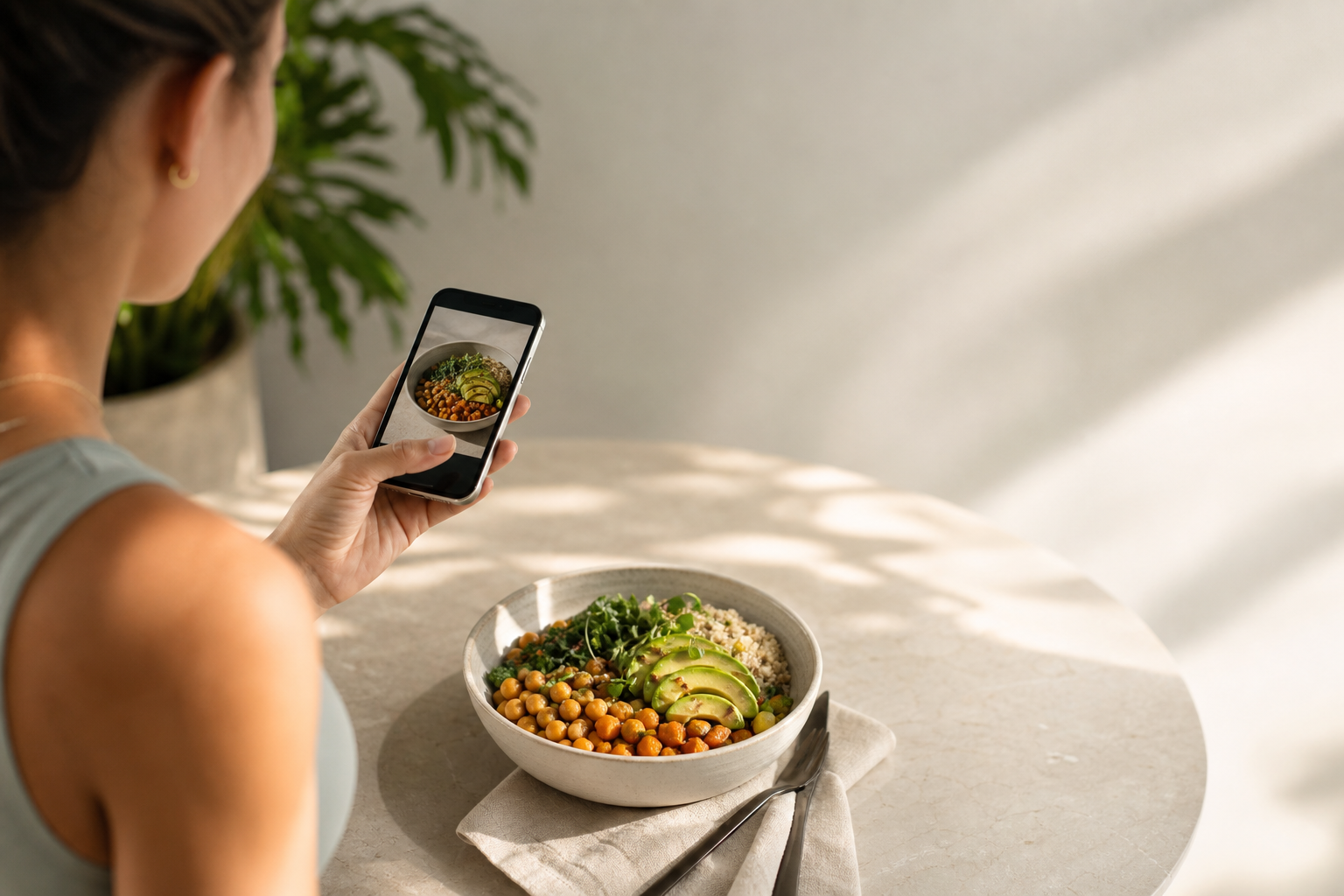
If you’re looking for the best photo calorie counter to make a calorie deficit simple and sustainable in 2026, you’re in the right place. This guide shows how photo-first logging boosts consistency, what features actually matter, and why Calorie Tracker Buddy lines up with real-world weight-loss needs.
Download Android App Today → And see how measurement drift creeps in over time in this deep dive on how accurate are calorie counters.
Portion size guessing can swing 25–50% on common foods, and mixed plates are notoriously hard to split into parts without help. When an app forces you to type each bite, it drains willpower daily, which is why people stop after the novelty fades. Add in the fact that, without fast feedback, small slips add up unnoticed, and you get a perfect recipe for inconsistency. Photo-first logging tackles each of these problems by letting you capture what you ate in a snap and learn from it before the moment passes.
For sustained progress, the best photo calorie counter should cut the steps between “I ate this” and “Here’s what it means for my goal.” That tight loop makes the habit easier to keep.
What to Look for in a Photo Calorie Counter for Weight Loss
A good buyer’s guide protects you from flashy claims and focuses on what matters. Below are seven factors that make or break your real-world results in 2026. Use them to judge any photo-first tracker you try.
1) Photo recognition accuracy
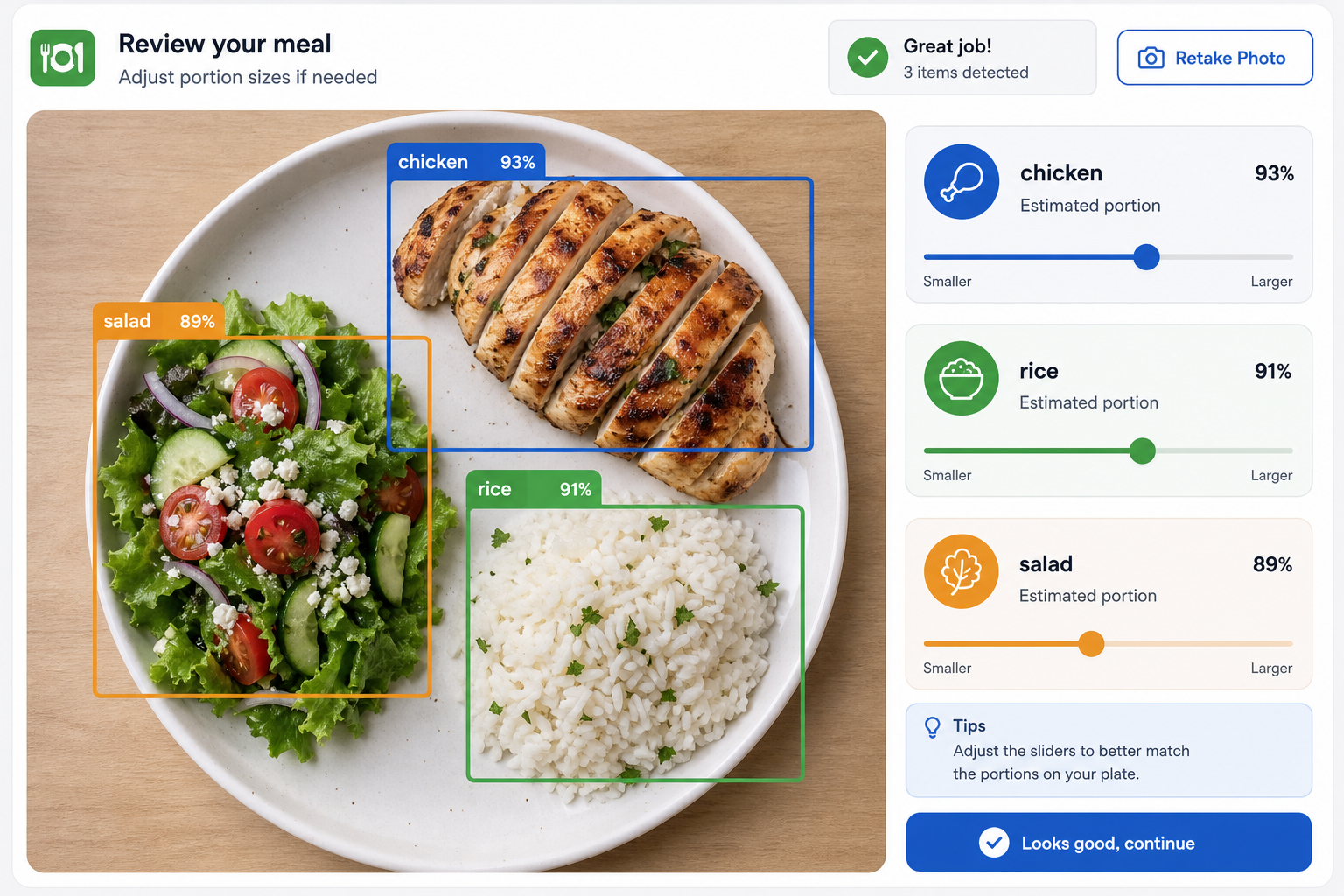
Accuracy isn’t just about spotting an apple. It’s about mixed meals: tacos with toppings, salads with add-ins, curries with rice. Strong apps detect multiple items in one image and give a sensible macro split. Moreover, they let you correct fast. The faster you can tweak, the more you’ll trust the log.
Look for multi-item detection that can label a plate as tortilla, chicken, salsa, and cheese at the same time, and ask the app to show editable confidence scores with clear overlays so you can verify at a glance. You should be able to adjust portion sizes with simple half, 1x, 1.5x, and 2x controls and see calories, carbs, protein, and fat update instantly. Prioritize systems that learn from your corrections so repeated meals become near one-tap logs over time, and keep an eye out for an optional second-angle photo feature that improves volume estimates for bowls and tall items without extra fuss.
2) Speed of feedback
You need real-time breakdowns, not a delayed estimate. Instant results help you adjust portions before you finish the plate. As a result, small daily choices line up with your weekly target. Delays, on the other hand, dull the learning loop and lower adherence.
Eat, snap, adjust, proceed. That 10–20 second loop is what turns knowledge into a consistent habit you’ll actually keep.
To keep that loop tight, look for snappy on-device or low-latency cloud AI. Even a 3–5 second delay adds friction; 10+ seconds turns into “I’ll do it later,” which often means never. The best photo calorie counter pairs fast analysis with cached foods and remembered edits, so repeat meals feel nearly instant.
3) Macro tracking beyond calories
Two 500-calorie meals can act very differently in your body. Specifically, higher protein helps hold muscle and improve satiety during a cut. Carbs and fats balance energy and mood. Therefore, you need a clear, per-meal view of carbs, protein, and fat, not just total calories.
Instead of treating all calories as equal, compare how meals differ: a 500-kcal plate with 40 g protein, 45 g carbs, and 18 g fat tends to keep you fuller and supports training, while a 500-kcal option with 8 g protein, 70 g carbs, and 22 g fat can feel snacky and may not sustain satiety as long. Fiber and sugar visibility are practical add-ons because they guide you toward produce-forward meals that keep hunger and energy more steady. When you can see macros instantly, you learn to balance the next meal without guesswork, which prevents the “good all day, ravenous at night” cycle.
4) Motivation and accountability
Most people don’t fail on day one. They fade on day 10–14. Streaks, reminders, and light gamification can keep the habit alive. Furthermore, social posting or a buddy system adds friendly pressure, which research shows boosts adherence. Real-time goal progress and predictions keep your “why” in view.
Motivation features that actually help are the ones that remove shame and highlight doable next steps. Streaks with forgiveness, like a streak freeze or grace period while traveling, protect your momentum during real life. Small, variable rewards such as a growing character, confetti, or encouraging messages make the act of logging feel good enough that you want to return. Private or public sharing options let you choose accountability without pressure, and gentle nudges work best when they suggest an action (drink water, walk five minutes) instead of scolding. Progress recaps that celebrate non-scale wins like consistency, steps, and sleep help you see the big picture beyond the number on the scale.
5) Dietary customization
Allergies, intolerances, and preferences matter. The app should respect your choices and offer swaps that fit your plan. In addition, advice should reflect your diet style, not a one-size-fits-none script.
Look for concrete customizations such as allergen filters (e. , flag peanuts, shellfish, or dairy so suggested swaps avoid them) and cuisine or ingredient preferences (e. , favor Mediterranean dishes, avoid cilantro, or lean toward vegetarian).
Smart swap suggestions should keep macros aligned with your targets, so if you replace fries with a side salad, the app shows the protein/fiber trade-offs as well. Power users may want a toggle for net carbs or total carbs depending on their approach, along with the ability to save favorite custom meals that can be applied with one tap when leftovers or weekly staples come up again. When the app meets you where you are, it frees up energy for choices that matter.
6) Offline capability
You won’t always have Wi‑Fi at restaurants, on planes, or while traveling. Offline logging prevents gaps that break streaks. Then, when you’re back online, syncing should be automatic. Missing logs kill momentum.
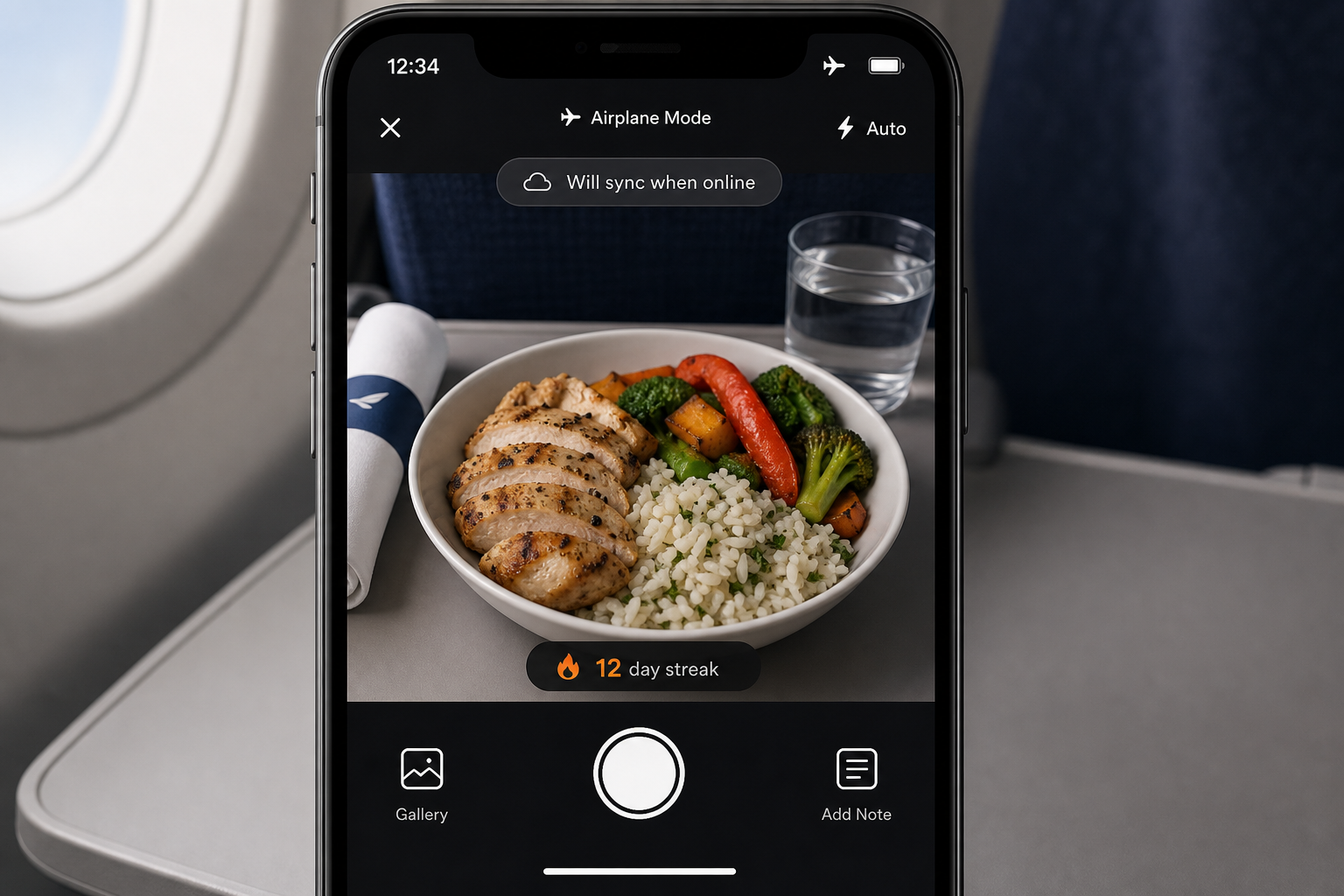
A reliable offline mode should also preserve timestamps and local time zones, so travel doesn’t scramble your charts. If image recognition needs the cloud, the app should still capture the photo and let you add a quick label now, then enrich with macros when you reconnect. In practice, that means you can step off a flight, open the app, and watch the last few meals resolve into full macro entries without lifting a finger.
7) Fitness tracker integration
To manage a deficit, you need the full picture. Apps that sync steps and workouts can show your net calories and adjust advice. For example, syncing with Google Fit centralizes steps and activity so your daily target reflects both intake and burn. For more on intake and burn balance, see the CDC overview on weight loss basics at cdc. gov.
Pro tip: If an app treats exercise as a manual afterthought, your “net” calories will drift. Automatic pulls from a trusted hub like Google Fit keep the math honest.
Quick checklist:
- Mixed-meal photo ID with fast corrections
- Instant macro breakdowns per meal
- Streaks, nudges, and social accountability
- Allergy and preference filters
- Offline logging with auto-sync
- Google Fit or similar integrations
If an app nails these, it earns a shot as your best photo calorie counter, not because it promises magic but because it removes the grind that made you quit last time. For a feature explainer that builds on this list, read the deep dive on photo calorie counter.
Also Read!
Calorie Tracker Buddy vs Lose It! for Gym-Goers: Which Is Better for AI Photo Calorie Counting?
How Calorie Tracker Buddy Uses Photo AI to Simplify Weight Loss
Instant photo-to-macro feedback
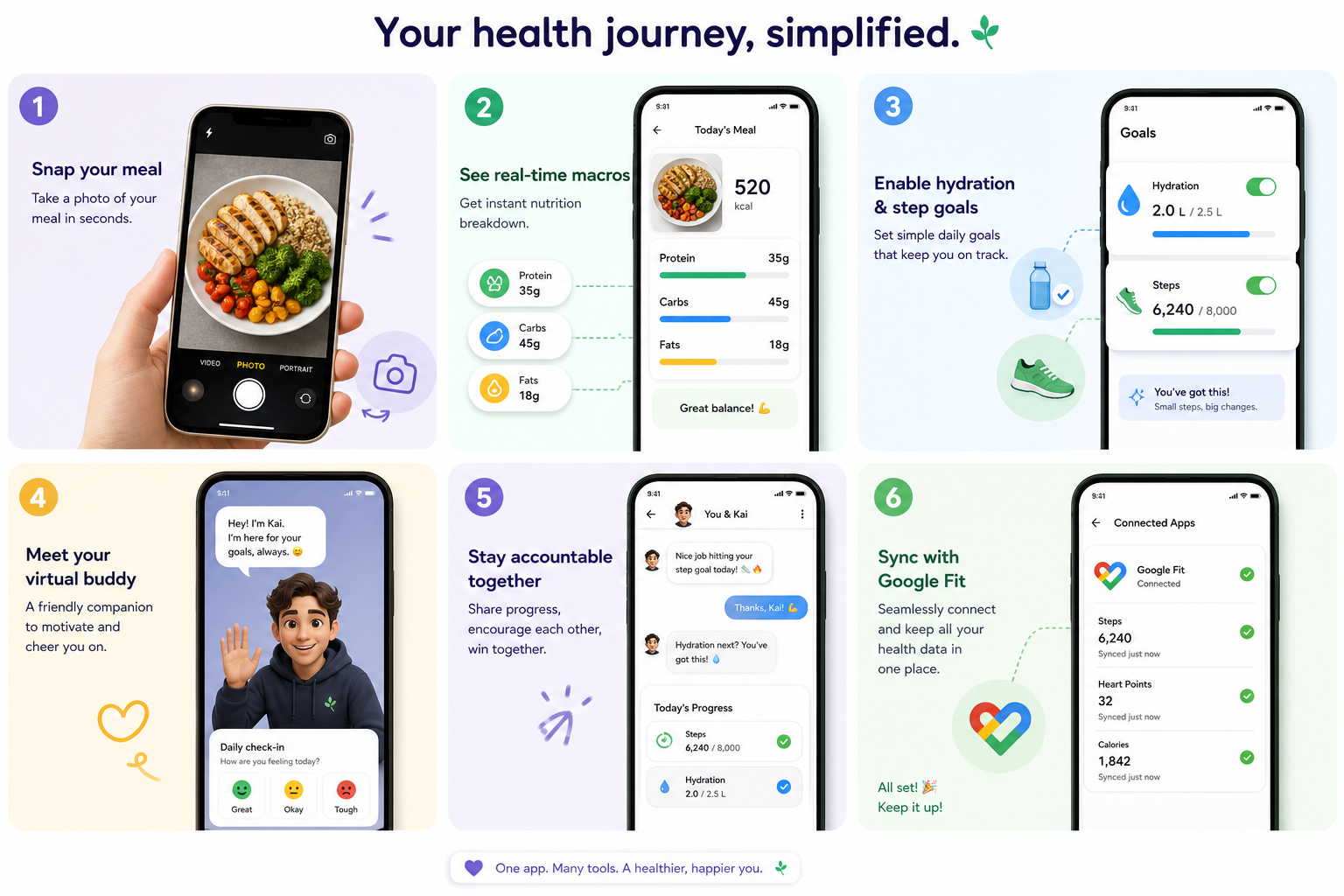
Calorie Tracker Buddy lines up directly with the buyer’s checklist above. First, you snap a photo of any meal or snack. Then the app analyzes the image and returns instant nutritional info with a calorie count. That speed matters. Because the feedback is real time, you can adjust portions on the spot and still hit your day’s target.
At a glance, each photo returns a calorie estimate with a confidence range, plus carbs, protein, fat, and fiber breakdowns you can skim in seconds. You’ll also see simple portion sliders (0.5x, 1x, 1.5x, 2x) that instantly recalculate macros and calories before you commit, and there’s a quick-save option to add the meal to Favorites so you can log it even faster next time it appears in your week. The goal is to turn a friction-heavy chore into a fast scan-and-move moment you actually keep up with.
Tip: Use the slider before eating to preview how half vs. full portions change your macros. Pre-commitments prevent mindless bites.
Real-world accuracy you can edit
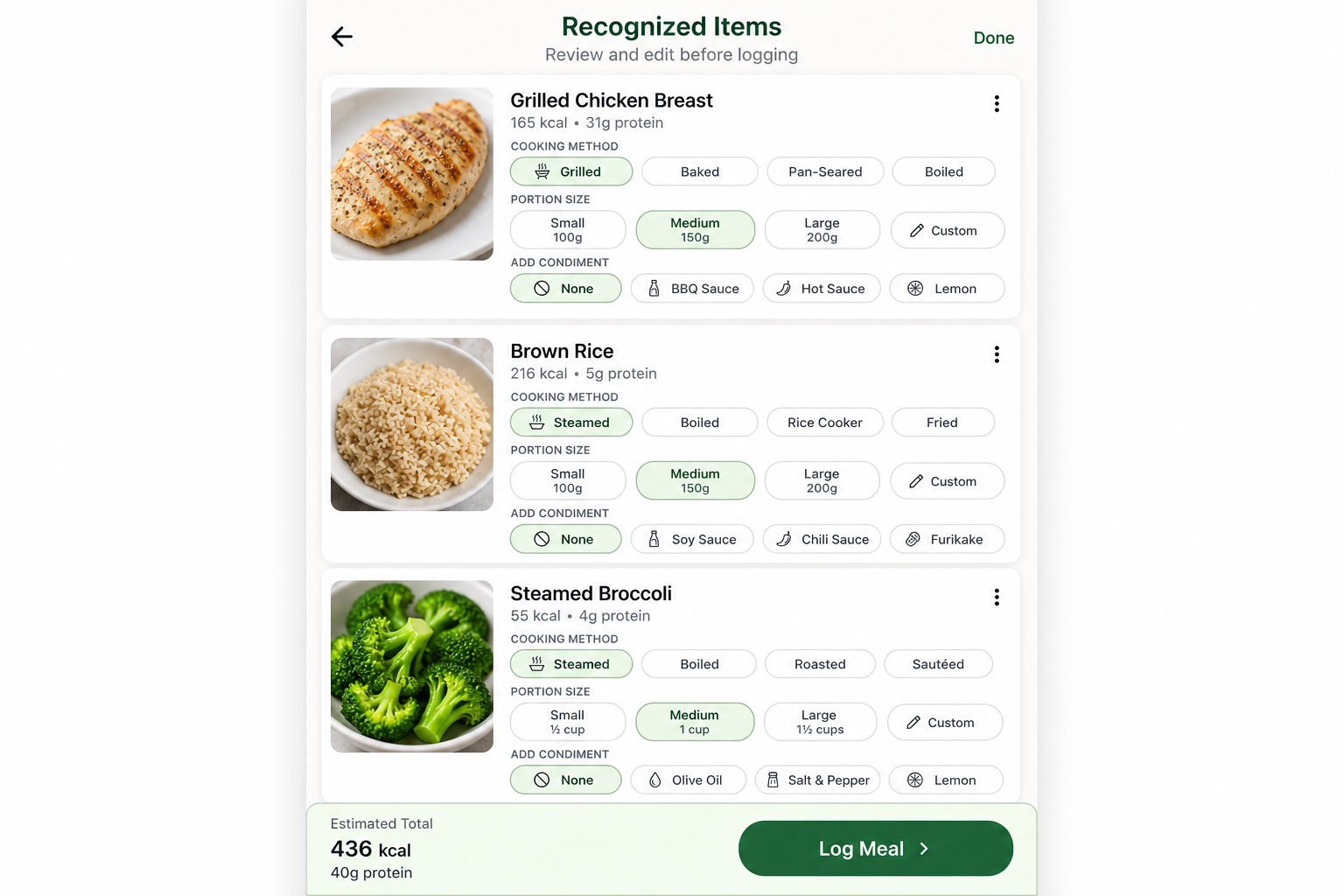
Accuracy goes beyond single foods. The photo system is built to identify mixed meals, split items, and estimate the macro mix in context. Moreover, you can make quick edits and teach the model what’s on your plate. Each correct nudge tightens future estimates. As a result, your log gets smarter the more you use it.
You can swap items (e.g., change “chicken” to “turkey breast” or “Greek yogurt” to “low-fat Greek yogurt”) when a similar ingredient is recognized, and you can refine cooking methods (grilled vs. fried vs.
sautéed) because preparation changes calories and fat. Portion size is editable by grams, volume, or simple counts like “1 tortilla,” “2 eggs,” or “8 shrimp,” and you can add sides or condiments such as “1 tbsp olive oil,” “2 tbsp salsa,” or “1 packet mayo” so the small stuff doesn’t slip through. If you cook at home, save custom items and recipes so the same dish logs in seconds on future nights, and over time those saved meals become your secret weapon for consistent tracking.
Reality check: Even with strong vision models, small errors happen. The best system minimizes them and makes corrections painless, so you stay consistent where it counts—your weekly calorie average.
Macros, hydration, and steps in one view
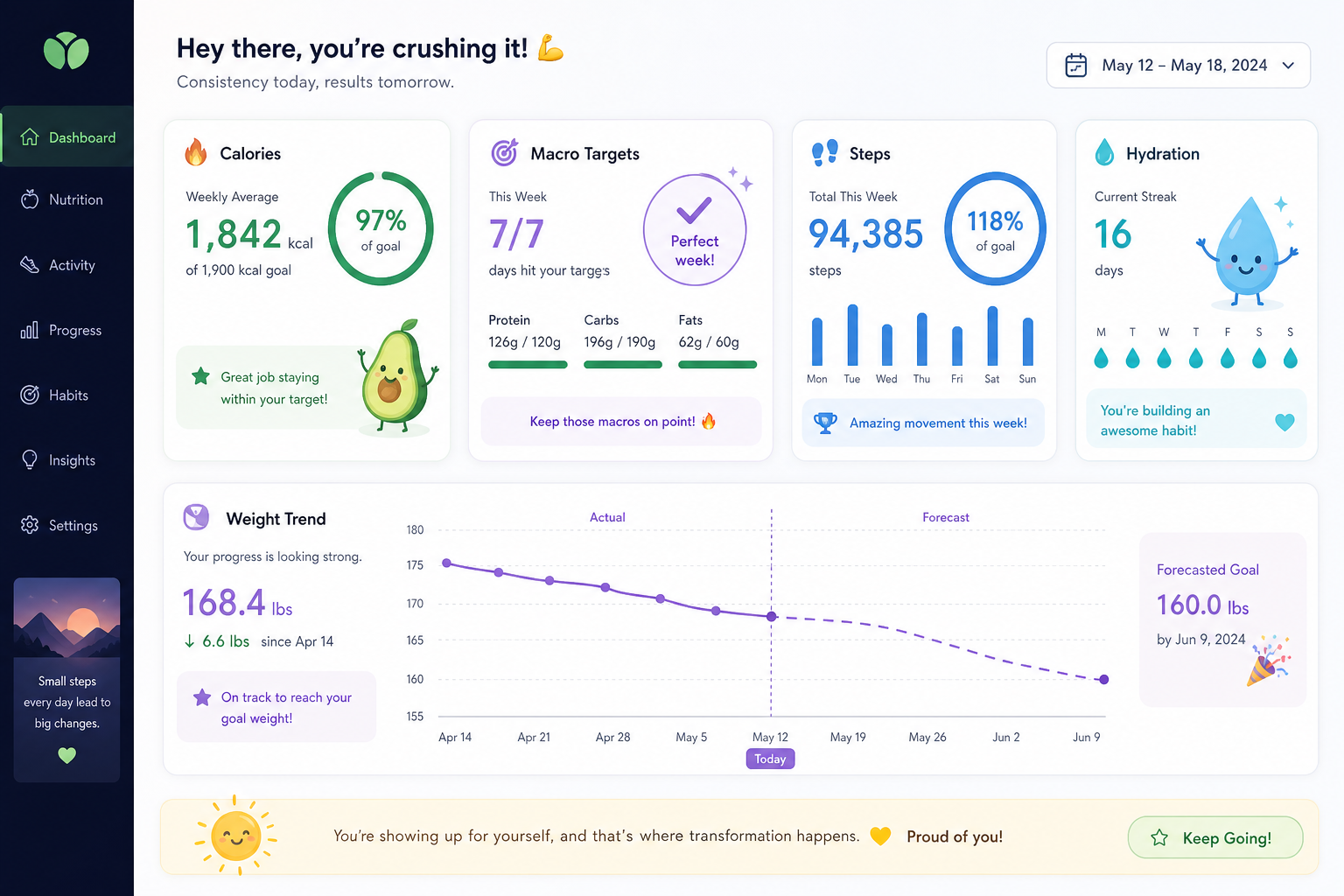
In addition, you see a full macro breakdown, carbs, protein, and fat, with every scan. That view makes it easier to choose a higher-protein option when you’re short or balance fats and carbs across the day. Water intake and exercise tracking sit alongside meals, so your intake and output live in one place. The app sets a daily hydration target of 2.5 liters per day and a daily step target of 10,000 steps per day, which gives you simple, science-backed defaults to start from.
Rather than overwhelm you with settings on day one, CTB provides defaults you can personalize as you settle in: Daily Step Target of 10,000 steps/day (adjustable to your baseline), Daily Hydration Target of 2.5 liters/day (or another goal if your clinician suggests different), macro emphasis that highlights protein and fiber to support satiety, and a net calorie view that subtracts activity from Google Fit so you always see the full picture. By keeping these anchors visible, the app nudges you toward easy wins like an afternoon walk or a high-protein snack when your counts are lagging.
Midday check-in: Open CTB after lunch to see if a short walk or lighter dinner keeps you aligned with your weekly target. Small nudges beat big overhauls.
Predictions that guide choices
Goal predictions are a standout. After each meal, you can see how that choice shifts your daily and weekly outlook. Therefore, one snap of a burrito becomes a clear picture of what it means for your deficit. That turns vague advice into decisions you can feel good about, without guesswork.
If lunch pushes you 250 kcal over your plan, CTB can propose three lighter dinner options and display the projected impact of each on your daily total, so you regain control without stress. A micro-forecast also shows whether a short 15-minute walk will bring you back on track, giving you multiple paths to win the day, eat a bit lighter, move a bit more, or both. Because the forecast updates live with every action, it becomes a practical compass rather than a scolding scoreboard.
Get Instant Photo Logging →
“I’ve been using Calorie Tracker Buddy for five weeks, and I’ve already lost 4kg! … the app doesn’t just make tracking easy, it keeps me motivated with my little buddy cheering me on.” — Alex Sim
Motivation that compounds
Motivation is built in. The virtual buddy “grows” as you make healthier choices, a small, visual reward that keeps streaks alive. It sounds cute, and it is, but it’s grounded in habit science: visible progress keeps you engaged. Offline logging covers you when you’re out of range; meals and workouts sync automatically once you’re back online, so you don’t break your chain.
“The meal snap feature is a big improvement. I’m actually excited to track my meals. It’s fun!” — Aanya Rastogi
Finally, Calorie Tracker Buddy tracks your meals, calories, and progress in real time, with social posting for meals and wins when you want some community accountability. It also offers an AI Menu Scanner to read restaurant menus and suggest goal-friendly swaps. Compared to alternatives that only scan barcodes or force manual entry, the photo-first flow plus instant predictions make it easier to be consistent, which is how the best photo calorie counter earns its spot on your home screen.
Try Calorie Tracker Buddy Free on Google Play →
Try it risk-free (trust signals that matter)
You don’t have to take our word for it. Testimonial proof from real users like Alex Sim and Sandy T highlights steady, healthy weight loss with CTB’s photo-first flow, and you can validate that the day-to-day experience fits your routine without paying a cent. The app is free to download on Google Play, and you can explore features and review plan options before deciding if premium fits; if you do upgrade, cancellations are handled directly in your Google Play account settings.
Authority anchors and platform controls reinforce that you remain in charge. This guide links to public-health guidance from the CDC for weight-loss fundamentals, and CTB integrates with Google Fit to centralize steps and workouts from a trusted platform. You decide what to sync and can manage permissions in Android settings. Data transparency matters as well: export your logs, delete entries, and control social sharing at any time. Food photos are processed to return nutrition estimates, and you choose what stays in your history.
Also Read!
Why Users Trust Calorie Tracker Buddy for Weight Loss
Trust grows when data lines up across apps and devices. Calorie Tracker Buddy syncs with Google Fit, so steps and activity flow in without extra taps. Therefore, your net calorie view reflects both intake and burn as the day unfolds. That live picture helps you make better calls at dinner, not just post-hoc notes at night.
Defaults also matter. A Daily Step Target of 10,000 steps/day and a Daily Hydration Target of 2.5 liters/day give you clear, science-backed baselines to start from on day one. You can adjust goals as needed, but you don’t start from a blank screen. In addition, CTB’s option to send personalized fitness tips based on your activity and progress feels like adaptive coaching, not static advice.
Social posting and community accountability are built in. When you share meals, workouts, or streak milestones, you get support and friendly pressure to stay on track, both shown to improve adherence in behavior research. Moreover, custom challenges created for your goals give you short, winnable targets that stack into bigger results.
“I like that my step count from my watch and the app’s net calories always agree. It sounds small, but that consistency makes me trust the plan—and actually follow it.”
Community and accountability in practice
Share a quick “macro win” story after lunch to get encouragement for dinner, or join a 7-day step streak with a friend so your net calories reflect the extra movement without you doing any extra math. When you want quiet focus, switch to private mode and keep logging just for yourself, then flip public for milestone moments to celebrate with your circle. The point is flexible support: accountability when you want it, space when you don’t.
- Signals that build trust day to day:
- Clear, per-meal macro visibility so you know what you just ate
- Consistent syncing that matches your wearable’s steps and workouts
- Gentle nudges that feel timely, not spammy
- Weekly review cards that highlight trends (e. g.
To deepen that trust, CTB surfaces the same signals consistently throughout your week. Clear, per-meal macro visibility ensures that you understand what you just ate, while reliable syncing keeps your wearable’s steps and workouts aligned with the app’s totals. Nudges arrive when they can help, before dinner, after a sedentary afternoon, rather than as random pings. Weekly review cards summarize trends such as weekend vs. weekday calorie drift, average protein per day, which meals push you over, and how often you hit hydration and step goals, so you can course-correct without guesswork.
Proven, sustainable results
The proof shows up in real outcomes. Users report losing 4kg in five weeks (Alex Sim) and 5kg with more energy (Sandy T). Numbers like these come from consistency, which comes from lower friction and timely feedback. Fitness Coach mode is a final trust anchor: the app doesn’t just track, it coaches, with tailored advice, challenges, and motivational support that meets you where you are.
CTB delivers real-time feedback on every meal and snack and keeps macro tracking across carbs, protein, fat, water, and exercise in one place. Goal predictions show how each meal will affect your pace so you can make trade-offs you’ll actually keep, and offline logging ensures your streaks survive travel and spotty service. Social layers and coaching make showing up feel rewarding rather than tedious, which is how small wins compound into noticeable progress over a few weeks.
In short, the best photo calorie counter should earn your trust by showing you what to do next, not just what you did.
How to Start Using a Photo Calorie Counter for Weight Loss
You don’t need a perfect day to get started. You need one photo and a simple plan. Follow these steps to get past the two-week cliff and into results you can feel.
- Download and set your goal
- Set a weight-loss target and a daily calorie deficit you can sustain.
- Keep it modest so you don’t burn out in week one.
- Enable predicted finish dates so you see how consistency compounds.
- Set dietary preferences and allergies
- Tell the app what you avoid and what you prefer.
- Get tailored tips and smarter swaps right away.
- Save two go-to breakfasts that hit your protein target; remove morning guesswork.
- Start with one meal
- Snap your lunch and review the instant breakdown.
- Note the macros and how it fits your day’s target.
- Add any sauces or sides; the small stuff counts but is easy to capture.
- Learn, don’t chase perfect
- Use real-time feedback to adjust portions across week one.
- Small, steady tweaks beat strict rules you can’t keep.
- If you miss a log, add a quick estimate and move on; perfectionism is the enemy of momentum.
- Enable steps and hydration
- Turn on step tracking and hydration reminders.
- Aim for 10,000 steps/day and 2.5 liters/day to round out your plan.
- Use a “movement snack”—5–10 minutes—after bigger meals to smooth out your day.
- Meet your virtual buddy
- Let the buddy “grow” with your choices to keep streaks alive past day 14.
- Celebrate small wins; they stack fast.
- Use streak freeze during travel so life events don’t erase your progress.
- Sync with Google Fit
- Pull in activity data so you see net calories, not guesses.
- Keep all your progress in one place.
- Verify permissions so steps and workouts flow automatically.
For more gentle, practical tactics to keep logging light, read the guide on calorie tracking and avoid common pitfalls like overestimating calorie burn. With these habits in place, the best photo calorie counter becomes a daily helper, not another app you ghost.
- Week-by-week focus to build momentum:
- Week 1: Photograph one meal per day; practice nudging portions
- Week 2: Add a second meal and turn on hydration reminders
- Week 3: Bring in steps and social posting if you like accountability
- Week 4: Lock in a comfortable deficit and let predictions fine-tune meals
- Week 5: Save three favorite dinners as templates; reduce nightly decision fatigue
Track With Photo AI Today →. Users like Alex Sim (down 4kg in five weeks) and Sandy T (down 5kg total) report that CTB’s goal predictions make it easier to hold a sustainable deficit without harsh rules. The app’s live forecasts show how each meal impacts your pace, which helps you string together consistent days that add up.
Also Read!
Calorie Tracker Buddy vs Lose It! for Beginners: Which Is Better for AI Photo Calorie Counting?
Frequently Asked Questions
Will a photo calorie counter work for different cuisines (e. g., Indian, Mexican, Mediterranean)?
Photo models are trained on these common foods, and CTB is designed to identify multiple items on a plate regardless of cuisine. If a curry includes rice and a side, or a mezze plate mixes dips and breads, you can refine any recognition in seconds. Over time, quick corrections help the app return better defaults for your typical meals. This means your favorite regional dishes can still fit neatly into your goals without painstaking searches.
What if my photo is blurry or taken in low light?
Good lighting helps any vision model. If a photo is blurry, you can retake it or add a quick note to correct the item and portion. CTB is built for real life, restaurants, office kitchens, and dinner at home, so you can also adjust items manually when needed, and you’ll still get instant macro and calorie feedback. A simple habit, holding steady for one extra second, usually solves most recognition hiccups.
Is photo logging as accurate as barcode scanning or manual entry?
It depends on the context. For packaged foods with labels, barcodes provide exact serving data when you measure the portion precisely. For homemade or mixed meals, high-quality photo models can be more practical and often more accurate than guessing entries manually, because they identify components (e. g., tortilla, chicken, salsa, cheese) and estimate a sensible macro split. The best approach blends both: scan barcodes for labeled items, use photo logging for plates and restaurant meals, and make quick edits either way.
Do I need to weigh my food, or can the app estimate portions from photos?
You don’t have to weigh everything to make progress. CTB estimates portions from visual cues and lets you nudge serving sizes (e. g., “half cup rice,” “1.5 chicken thighs”) in a couple of taps. If you do weigh or measure occasionally, that calibration improves your eye for portions and tightens estimates over time without turning every meal into a math exercise. Think of measuring as a periodic tune-up, not a daily assignment.
Will my food photos be private? What about data security?
You’re in control. On Android, you decide camera and storage permissions. Photos used for recognition are processed to return nutrition estimates; you can delete logs any time, and you choose what, if anything, to share socially. When connecting to Google Fit, you grant only the permissions you want and can revoke them in Android settings. CTB follows standard platform practices to protect your account and connected data.
Does it work offline and when traveling?
Yes. Offline logging prevents gaps when you’re on planes, subways, or in restaurants with spotty service. CTB stores logs locally and syncs automatically when you’re back online, so your streak and trends remain intact, even across time zones while traveling. Timestamps are preserved so your charts won’t get scrambled by long flights.
Can Calorie Tracker Buddy integrate with my smartwatch or fitness tracker?
CTB syncs with Google Fit, which centralizes steps and activity from many Android-compatible wearables. That makes your net calories more accurate, since the app considers both intake and burn. When you add a workout in your watch, your daily target in CTB adjusts accordingly. This connection also reduces double-logging and keeps your numbers consistent across devices.
How much does it cost, and is there a free version?
You can download CTB for free on Google Play to try photo logging, explore features, and review plan options. If you choose a premium plan, you can cancel any time in your Google Play account settings. This low-friction start lets you test whether photo-first tracking fits your routine before committing. Pricing and promotions can change by region, so check the listing for the most current details.
Does a photo calorie counter work for keto, vegetarian, or gluten-free diets?
Yes. Set your dietary preferences and allergy flags in CTB. The app tailors tips, swaps, and goal nudges to your style, whether you prioritize higher protein, low-carb meals, or plant-forward options, so guidance stays relevant without forcing a one-size-fits-none plan. You can toggle net carbs if you track that metric specifically.
Can it handle home-cooked recipes and leftovers?
Absolutely. Snap your plate and the model will identify components; you can also save custom meals for recipes you cook often. For batch-cooked dishes, log the recipe once, note total servings, and then use quick-add portions on future days. Over time, these favorites make logging even faster, especially for recurring weeknight meals.
Is there an iOS version of Calorie Tracker Buddy?
Right now, CTB is available on Android via Google Play. For iOS availability and updates, check the official website or app listing for the latest status before you decide on a tool. If you’re switching devices, you can export your data and import or re-create your core habits as needed. Platform roadmaps evolve, so watch announcements for future support.
How does a photo calorie counter stay accurate over time?
Two things help: occasional calibration and fast corrections. If you weigh a few representative meals or scan barcodes for labeled items weekly, your “portion eye” improves. Pair that with quick edits after photo recognition and the app learns your typical meals, shrinking errors in the foods you eat most often. Consistency matters more than perfection, small, steady improvements add up.
Can I use a photo calorie counter with medical conditions like diabetes?
A photo-first app can make carb visibility simpler for meal planning, but it isn’t a medical device. Use CTB to see carbs and macros at a glance, and work with your healthcare provider for individualized targets or timing. If you track fiber or net carbs, you can align the app’s fields with your professional guidance. Always follow medical advice if macronutrients need to be timed with medication.
How accurate is the best photo calorie counter compared to a dietitian?
Dietitians can account for recipe nuances and preparation details that photos sometimes miss, while leading photo models excel at fast, practical estimates in everyday settings. In side-by-side use, a photo-first approach can keep you within a small margin of error on weekly averages, which is what drives weight-loss results. For special cases, complex recipes, medical nutrition therapy, use the app for convenience and lean on professional input for precision.
What Android versions and devices does CTB support?
CTB is built for modern Android phones and integrates with Google Fit; performance and availability may vary by device and region. For the smoothest photo recognition and syncing, keep your OS and the app up to date. Check the Google Play listing for minimum version requirements and supported features in your country. If your device is older, basic logging will still work, but some AI features may run more slowly.
Can I export my data or back it up?
Yes. CTB provides data transparency so you can export your logs and keep personal backups. You can also delete entries or entire histories if you want to start fresh, and you control what is shared socially. If you change phones, your account pulls your data back down once you sign in and sync.
The Bottom Line
- The right photo tracker lowers friction so you keep logging past week two.
- Real-time macros, goal predictions, steps, and hydration make day-to-day choices clear.
- Motivation features like the virtual buddy and custom challenges help you stick to a sustainable deficit.
If you want a tool built to be used, not just downloaded. Calorie Tracker Buddy aligns with how people actually eat and live in 2026. Try one photo today, learn from the instant feedback, and let small wins stack. Because the best photo calorie counter closes the gap between intention and action, you’ll spend less time typing and more time making choices that move the scale.