



The best social calorie tracker with meal sharing for beginners in 2026 is Calorie Tracker Buddy because photo logging, an in-app feed, and a friendly virtual buddy remove the hard parts and keep you engaged. If you’re new, social calorie tracking with meal sharing is the easiest way to start. That mix turns “I should track” into a quick daily habit.
**Download free on Android →
Free to start, no credit card required.
Why this approach sticks
Here’s the simple truth: you’ll stick with a tool that feels light, teaches as you go, and includes people cheering you on. You don’t need to study nutrition before you begin. You only need a low-friction way to log meals and a nudge from a supportive community. The rest can click into place.
However, your first week can feel awkward. You may not know how to log a mixed plate or what all the macro numbers mean. You may feel alone.
That’s normal, not a flaw in you. Research on health app use shows big drop-offs in the first two weeks because tracking in isolation is tough and the feedback loop is blurry (source: PubMed and university adherence studies). Add friendly accountability and clear, instant feedback, and you change the game.
In this guide, you’ll learn which features fix those beginner hurdles, how Calorie Tracker Buddy maps to that checklist, and how it compares with MyFitnessPal and Lose It! for 2026. You’ll also get a five-minute setup plan you can follow today.
Why Beginners Struggle with Calorie Tracking (and Why Social Features Change Everything)
Most first-timers run into the same three walls. First, you’re not sure what or how to log. Is that “pasta, 1 cup,” or “pasta + sauce + cheese”? Second, tracking gets lonely.
By week two, you’re talking to a blank screen, and the habit fades. Third, numbers pile up fast. Macros, calories, goals, it can feel like a spreadsheet, not a guide.
You’re not alone if you stop within about 14 days. Surveys on mobile health apps show steep early drop-offs when tasks are tedious and social support is missing. That’s not laziness. It’s isolation. You’re doing hard work with no shared momentum and little real-time teaching.
How social features fix early hurdles
However, sharing meals in a health-focused space pulls you back in. For example, your friend posts their lunch with calories and a quick win. You see “imperfect” meals that still fit the day.
As a result, you learn by doing, not by guessing. A quick photo and a supportive comment turn into a streak before you know it. The habit sticks because you feel seen.
Moreover, social support links to better adherence across health goals. The Social support literature shows that encouragement and accountability can boost follow-through.
- A feed where people share meals and small wins
- Quick check-ins or reactions that reward effort, not perfection
- Teachable moments: “Here’s how I made this burger fit my day”
Therefore, the problem to solve is not motivation in a vacuum. It’s building a simple loop: snap → share or save → get instant feedback → feel supported → repeat. In 2026, tools can do that with photo-based logging, a built-in social space, and real-time learning that trims the data noise.
Also Read!
How to Use a Calorie Tracker with Coaching to Hit Your Gym Goals
What to Look for in a Social Calorie Tracker as a Beginner
You don’t need every bell and whistle. You need features that remove the early friction and make it easy to come back on day 7, 14, and 30. Here’s the beginner-friendly checklist I use after testing dozens of tools.
1) Low-friction meal logging (photo beats manual for your first month)
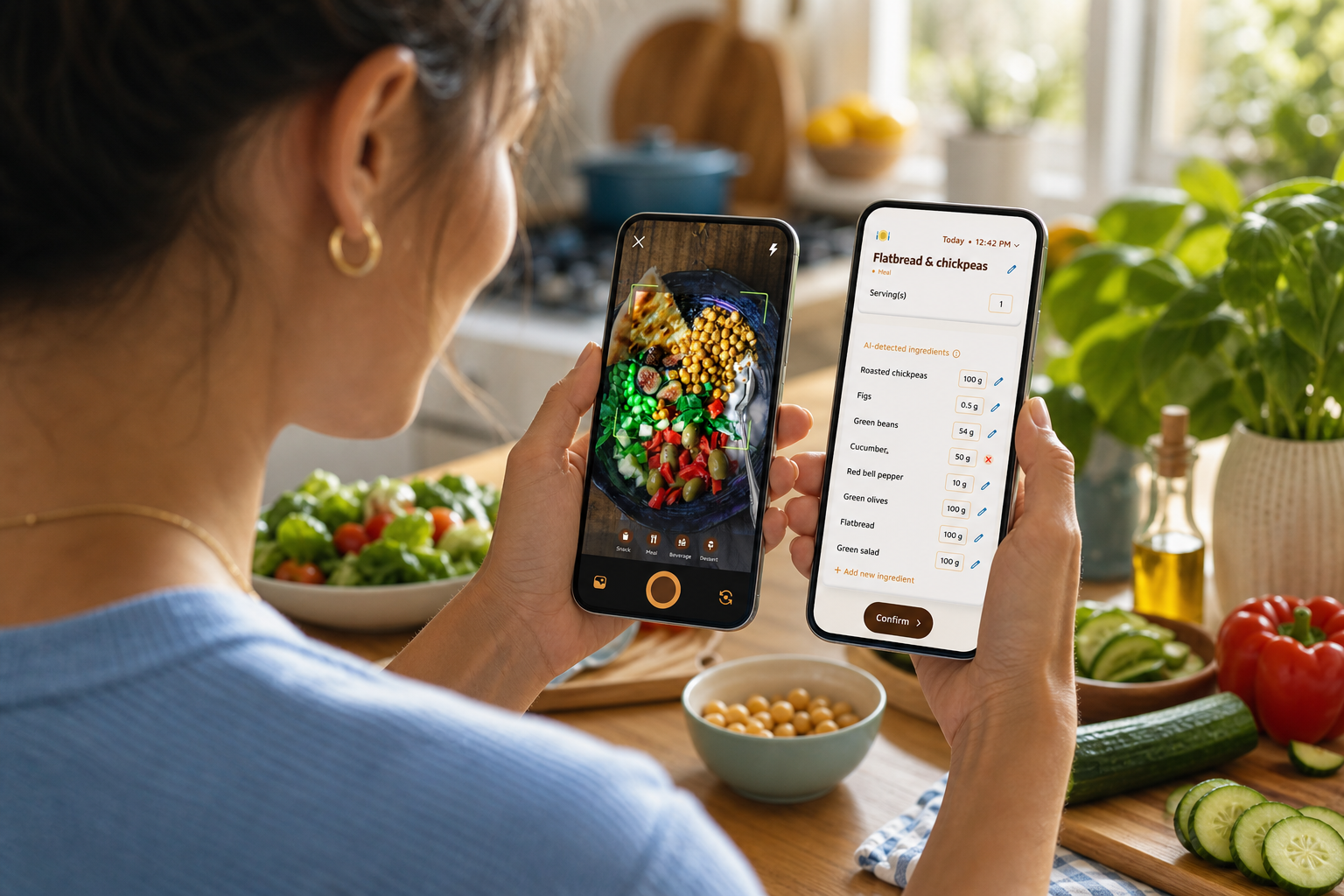
Manual search is where most people stall. You type “chicken,” get 50 entries, and give up. Photo-based logging lets you snap your plate and get instant estimates for calories and macros. As a result, you build the habit fast. You can learn the details later. If you want a deeper dive into why manual entry trips up new users, read why manual calorie tracking fails.
2) Built-in social feed or meal sharing (not just exports)
Exporting to Instagram is nice, but it’s not the same as an in-app community that shares the same goals. You want a health-only feed where meals include context, calories, streaks, and progress. That context creates real accountability without shame. It also normalizes “good enough” meals that fit your day.
3) Motivational mechanics (streaks, gamification, companions)
As a beginner, your goal is consistency, not perfection. Streaks, badges, or a virtual buddy make small wins visible. Small, daily rewards are sticky. They beat willpower alone in the long run, especially after a hard day.
4) Real-time feedback (teach as you log)
Instant breakdowns turn each meal into a mini lesson: “This plate adds 22 g protein and 400 kcal.” Over time, you learn how portions affect your day. You get a sense of balance without reading a textbook. For a gentle primer on the basics, this guide to calorie tracking mistakes shows what trips up first-timers and how to fix it.
5) Dietary customization (allergies and preferences)
If you’re vegan, allergic to nuts, or just don’t like eggs, the app should adapt. Filters keep advice relevant, so you don’t waste time on foods you won’t eat. Relevance keeps you engaged.
6) Offline capability (log anywhere, sync later)
You shouldn’t lose your streak because you’re on a subway or at a café with bad Wi‑Fi. Offline logging with auto-sync makes the habit travel-friendly. No service? No problem. You still track. It still counts.
Buying tip: If an app nails the six points above, beginners stick. If it misses even one, friction grows and tracking starts to feel like work.
For more background on the landscape, you can scan our unbiased roundup of calorie tracking apps and a broader look at the best calorie tracking app.
How Calorie Tracker Buddy Makes Social Calorie Tracking Easy for Beginners
Calorie Tracker Buddy maps directly to the checklist above and adds a few extras that make day-one feel doable and day-30 feel normal.
Photo-based meal logging
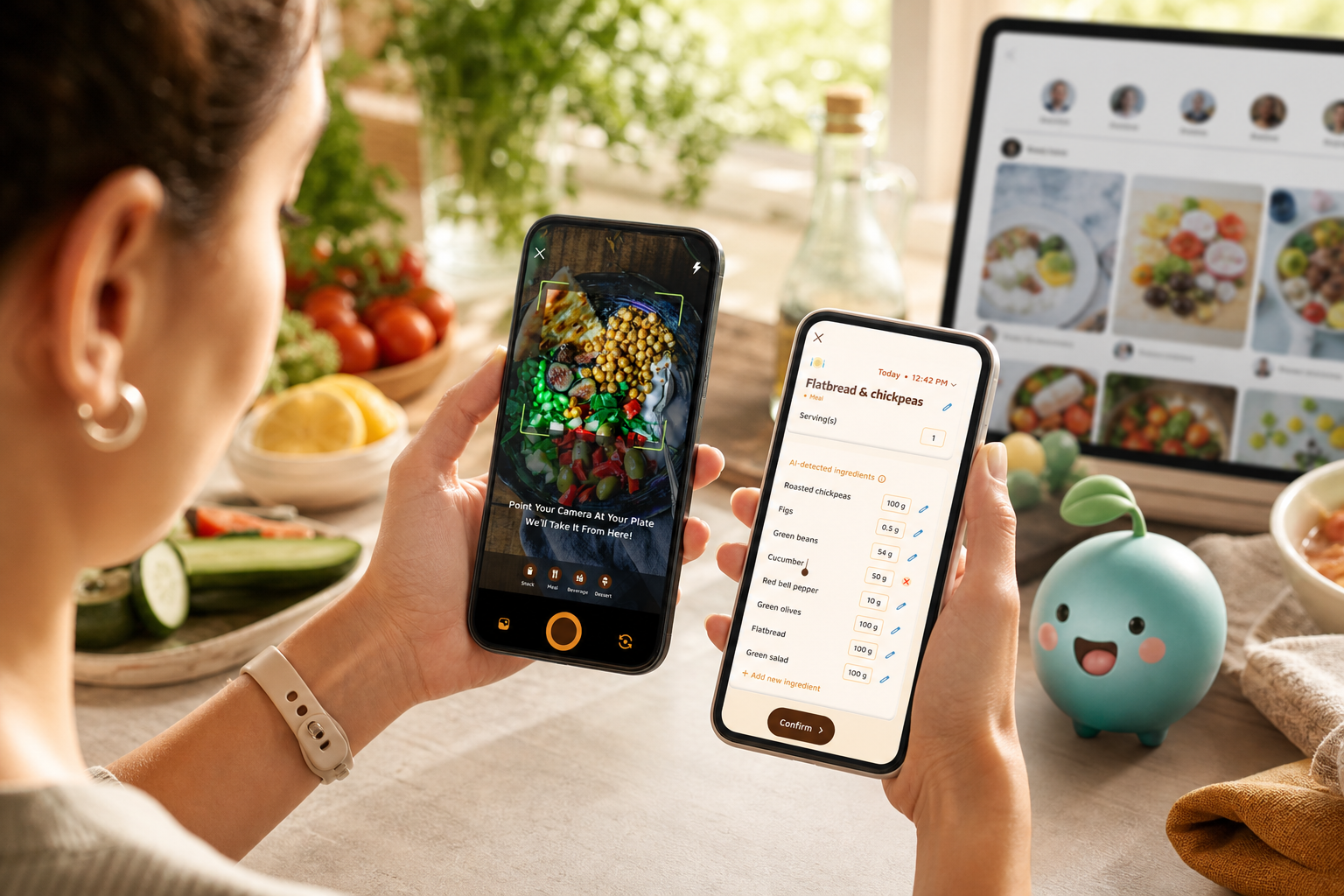
You snap a photo, and the app returns instant calorie and macro estimates for meals and snacks. There’s no hunting through a database or typing long names. As a result, you build a streak before your motivation fades. Over time, the app’s AI improves with your corrections, so the feedback gets sharper as you go.
“Before using the app, I didn’t know where to start with calorie tracking. But now, it’s second nature! The meal snap feature is a big improvement. I love how the app gives me tips and feedback in real time. My health buddy keeps me accountable, and I’m actually excited to track my meals. It’s fun!” — Aanya Rastogi
Social posting feed for meal sharing and wins
You can share meals, workouts, and daily wins with the in-app community. Unlike generic social platforms, posts carry context: calorie info, streak length, and progress. For beginners, that means friendly accountability without pressure. You see how others fit pizza into a day, and you learn without a lecture. This is social calorie tracking with meal sharing done right, it teaches by example.
A virtual buddy that grows with your habits
Your companion “grows” as you log meals, hit your step goal, and stay hydrated. That growth makes abstract goals visible and fun. It also turns effort into small, daily rewards. On days you feel flat, the buddy nudges you to keep your streak alive.
“I’ve tried tons of fitness apps, but this is, hands down, the best calorie tracker app I’ve ever used. Logging meals is fun now—just snap a photo and boom, done.” — Pooja Rao
Real-time feedback and goal predictions
Every meal shows what it adds to your day and how it affects your path to your goal. You see “If lunch looks like this, here’s how dinner can balance it.” Over time, you absorb macro basics: protein helps you feel full; carbs fuel activity; fats support hormones. A calorie deficit means you eat fewer calories than you burn, and the app visualizes that balance so it’s not a guessing game.
Dietary customization for allergies and preferences
You can set allergies and preferences from the start. The app then tailors suggestions, tips, and swaps. There’s no noise about foods that don’t fit your life.
Offline logging with auto-sync
You can log meals and workouts offline, then the app syncs once you reconnect. Your streak stays intact. Your data updates. No stress.
Fitness Coach mode, steps, and hydration
If you want expert nudges, Fitness Coach mode lets coaches inside the platform send tailored advice, create custom challenges, and offer motivational support. As guardrails, the app tracks a Daily Step Target of 10,000 steps/day and a Daily Hydration Target of 2.5 liter/day. It also syncs with Google Fit for steps and activity, so your movement data is accurate without extra taps.
Furthermore, the app tracks macros (carbs, protein, fat), water intake, and exercise in one place. That gives you full coverage without overload. This is why social calorie tracking with meal sharing feels approachable here: low friction, friendly support, and instant learning, all in one loop.
**Get started free in minutes →
Also Read!
Best Calorie Tracker with Coaching for Gym-Goers in 2026
Calorie Tracker Buddy vs Noom for Busy People: Which Is Better for Calorie Tracking with Coaching?
Calorie Tracker Buddy vs. MyFitnessPal vs. Lose It!: Which Is Best for Social Beginners?
If you’ve heard of calorie trackers, you’ve heard of MyFitnessPal and Lose It!. Both are solid: MyFitnessPal is well-known for a huge food database, and Lose It! is praised for a clean UI and barcode scanning.
If your top goal is the largest database, MyFitnessPal may serve you better. But if you care most about accountability and beginner ease, Calorie Tracker Buddy is built for you.
Why Buddy feels simpler on day one
Where other tools can overwhelm new users with data-first screens, Calorie Tracker Buddy starts with a snap and a smile. The in-app social feed puts meal sharing front and center, the virtual buddy turns consistency into a small daily win, and Fitness Coach mode means you can also get tailored advice and challenges without leaving the app. Compared to alternatives, beginners don’t have to fight the tool to build momentum.
At a glance
Here’s a quick head-to-head across the six buying criteria:
| Buying Criteria | Calorie Tracker Buddy | MyFitnessPal | Lose It! |
|---|---|---|---|
| Low-friction logging | Photo-based snap-and-log | Manual search first | Barcode scan + manual |
| Built-in social feed | In-app feed with context | Social features feel buried | Limited in-app community |
| Motivational mechanics | Virtual buddy + streaks | Streaks, fewer playful cues | Badges, no companion |
| Real-time feedback | Instant breakdown + predictions | Detailed logs, more manual | Clear logs, less teaching |
| Dietary customization | Preferences + allergies | Yes | Yes |
| Offline capability | Full offline with auto-sync | Partial | Partial |
“I’ve been using Calorie Tracker Buddy for five weeks, and I’ve already lost 4kg! I didn’t have to cut out my favorite foods. It’s all about balance!” — Alex Sim
Additionally, the social posting and buddy growth keep you engaged on day 10 as much as day 1. That’s the gap for true first-timers. Meanwhile, Lose It! shines for barcode scanning, and MyFitnessPal’s database is unmatched. Be honest about your needs: if you want simplicity, built-in accountability, and a gentle on-ramp, Calorie Tracker Buddy earns the nod for 2026.
“Not only have I lost 5kg, but I also feel more energized. The tips help me make smarter choices every day.” — Sandy T
Why Beginners Trust Calorie Tracker Buddy for Their Health Journey
This app is made for “beginners starting their health journey,” not just veterans who already know the ropes. From day one, you get structured targets that make sense: a Daily Step Target of 10,000 steps/day and a Daily Hydration Target of 2.5 liter/day. Those aren’t random numbers; they’re simple, trackable actions that build momentum.
Furthermore, the app tracks macros (carbs, protein, fat), water intake, and exercise without drowning you in charts. As you log, it sends personalized fitness tips based on your activity and progress. That might look like: “Nice protein at lunch, here’s a light dinner idea to hit your goal.” For added support, custom challenges can be created around your goals, which is helpful if you like small, time-bound pushes.
Motivation that feels natural
Real users say the design makes tracking “second nature” and even “fun”. Aanya’s words, not mine. That matters more than any single feature.
If a tool turns a chore into a small bright spot in your day, you’ll keep using it.
Finally, Google Fit integration is a quiet trust signal for accurate activity data. Your steps and movement sync without extra taps, so your calorie picture is complete and consistent in 2026 and beyond.
For a refresher on how calories work and why a modest calorie deficit leads to weight loss, the Calorie page explains the basics and links to related energy balance topics.
Also Read!
How to Get Started with Social Calorie Tracking in Under 5 Minutes
You don’t need a perfect plan. You need a quick start. Follow these steps and you’ll be tracking by your next meal, even offline.
-
Download Calorie Tracker Buddy and set up your profile. Enter your dietary preferences, allergies, and goals. That keeps advice relevant from day one.
-
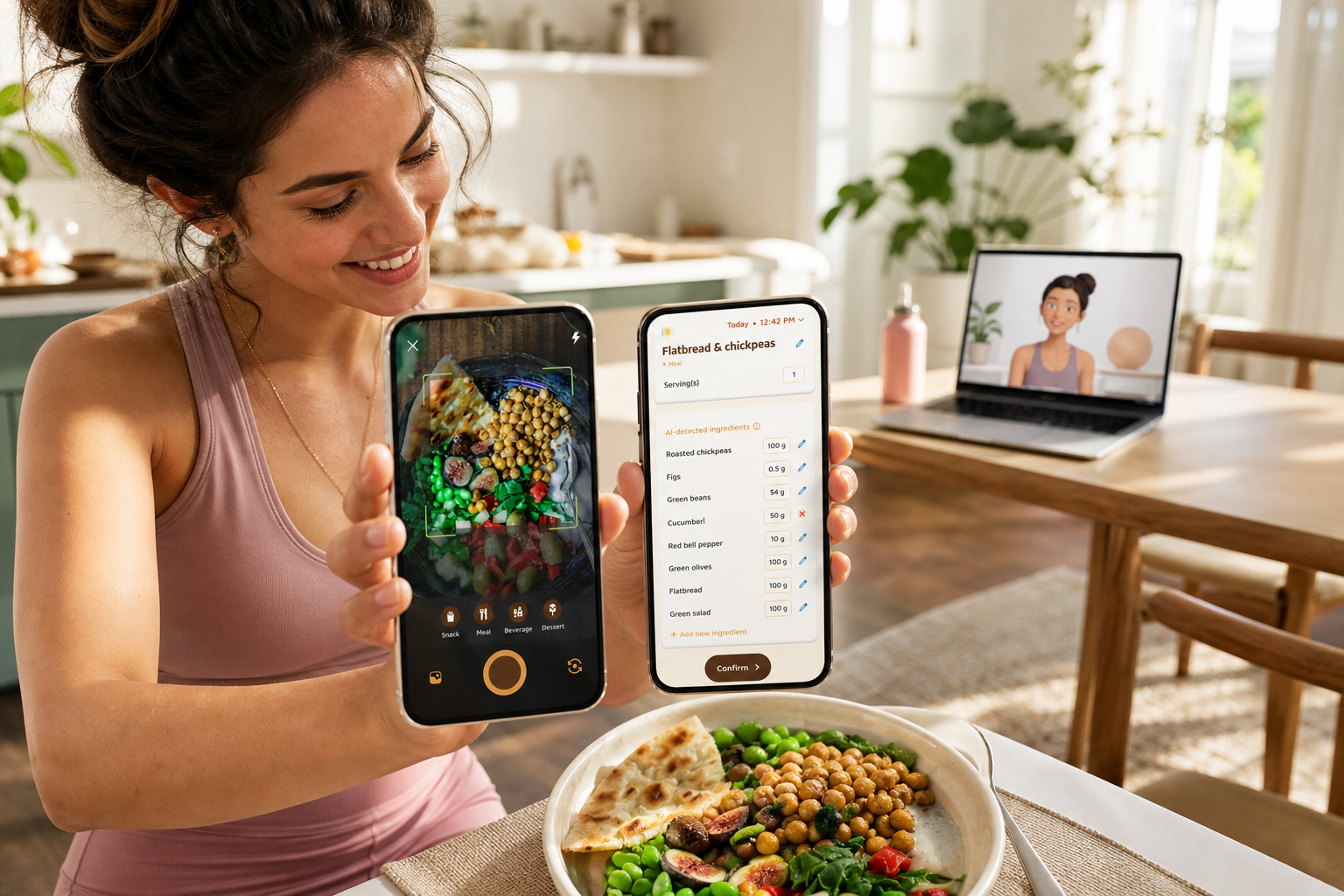
Take your first meal photo. The app returns calories and macros right away. No searching, no stress.
-
Meet your virtual buddy. This friendly companion grows as you log meals, hit steps, and hydrate. Growth equals progress you can see, not just numbers.
-
Share your first meal to the community feed. Posting even “imperfect” meals builds accountability. You’ll get encouragement and see how others fit real-life food into their day.
-
Set daily targets. The app suggests 10,000 steps/day and 2.5 liter/day as simple starting points. Small goals win over time.
-
Connect Google Fit for automatic step and activity sync. Your movement data now updates without extra taps.
-
Explore Fitness Coach mode if you want tailored challenges and advice. Coaches in the app can nudge you with bite-size goals built for beginners.
Because offline logging works, you can do all of this without Wi‑Fi and sync later. Try it free and see how light the habit can feel.
Frequently Asked Questions
Is Calorie Tracker Buddy free, or do I need a paid subscription?
Calorie Tracker Buddy has a free tier that includes core tracking, photo-based meal logging, and the virtual buddy. Social posting and meal sharing are available without a subscription. If there are premium features, they add advanced options, but beginners can start and succeed on the free plan. You won’t need a credit card to build your first streak.
How accurate is photo-based calorie tracking compared to manual entry?
No tracking method is 100% precise. Photo-based logging uses AI recognition to estimate calories and macros, then improves as you correct it. The real-time feedback loop teaches you faster than manual search alone. For beginners, the small trade-off in precision is worth the big gain in consistency and learning.
Can I use Calorie Tracker Buddy without sharing my meals publicly?
Yes. Social posting is optional. You can track privately and choose what to share and when. The virtual buddy and real-time feedback work on their own, so you still get teaching, streaks, and progress without posting.
How does the social sharing feature differ from just posting meals on Instagram?
The in-app community is health-focused, so your posts include tracking context like calorie info, streaks, and progress. That turns a photo into meaningful accountability and support. Instagram shows a picture; the in-app feed shows your plate and how it fits your day.
Is Calorie Tracker Buddy better than MyFitnessPal for someone who has never tracked calories?
If database size is your top priority, MyFitnessPal may fit better. For true beginners, Calorie Tracker Buddy is easier to start with because photo logging removes search, the virtual buddy rewards consistency, and the social feed keeps motivation high. If ease and support matter most, pick Buddy.
Does the app work offline, or do I need internet to log meals?
You can log meals and workouts offline. The app saves your entries and syncs them automatically once you’re back online. This helps when you’re at a restaurant, on a commute, or anywhere with poor connectivity.
What is the virtual buddy, and how does it help with motivation?
It’s a friendly, digital companion in the app that grows as you make healthy choices, logging meals, reaching 10,000 steps/day, and hitting 2.5 liter/day. It turns effort into visual progress and makes habit-building feel more like a simple game than a chore. Users say it keeps them coming back.
Can a fitness coach give me personalized advice through the app?
Yes. Fitness Coach mode lets coaches in the platform send tailored advice, create custom challenges based on your goals, and offer motivational support. The app also sends personalized tips based on your activity and progress, so you’re never figuring things out alone.
Wrap-Up: Your Best Start in 2026
- Start simple: snap meals, learn as you log, and share when you want.
- Pick the tool that fits you: if you value social support and low-friction logging, Calorie Tracker Buddy is purpose-built for beginners and social meal sharing.
- Build small daily wins: 10,000 steps/day, 2.5 liter/day, and one honest post can change your week.
This is social calorie tracking with meal sharing made friendly, not fussy. Try it for yourself and see how fast the habit sticks.