



**Download the app free today →
Three days in, your food log goes blank. A calorie tracker with coaching and challenges stops that slide by teaching you what to do next, not just what you ate. The fastest way to start in 2026 is to pair tracking with simple, in-the-moment guidance so you build habits instead of guesswork.
Right now, you might feel overwhelmed: What’s TDEE? How do macros work? Why do the numbers swing day to day?
You’re not alone.
I quit my first attempt after a week because logging felt tedious and I had no idea how to adjust. With coaching built into your tracker, you’ll get real-time feedback on meals, small weekly challenges, and nudges that turn data into action. You’ll learn as you log, and that makes sticking with it far easier.
What Is a Calorie Tracker with Coaching — and Why Does It Matter for Beginners?
A plain calorie counter records what you eat. A tracker with coaching responds to what you log with tips, challenges, and encouragement tailored to you. That difference matters most at the start.
You don’t need more data; you need guidance at the right moment.
Here’s the gap it bridges: logging food doesn’t teach you which small swap helps your goal today. Coaching connects the dots. For example, you log a bagel and latte at 10 a.m., then crash at noon. A coached tracker might suggest adding eggs or Greek yogurt next time for steadier energy, with a quick note on protein. That tiny lesson sticks because it lands right when you need it.
Plain counter vs. coached tracker
- Plain counter: You enter calories and see a number left for the day. No context.
- Coached tracker: You get real-time feedback on meals and snacks, plus short notes that explain why a change helps.
- Plain counter: You set a goal once and hope for the best.
- Coached tracker: Fitness Coach mode offers tailored advice, small challenges, and motivational support so you don’t stall.
If you’re a beginner, this matters because the first two weeks feel like information overload. You might not know your Total Daily Energy Expenditure (TDEE), or how protein helps with fullness. Coaching reduces that noise into one small step at a time. It also tackles the common drop-off: logging for three days, then stopping. When your tracker sets a simple challenge like “add a vegetable to lunch this week,” it gives you an easy win that builds momentum.
Moreover, a calorie tracker with coaching and challenges shortens the learning curve. Instead of reading a bunch of articles, you learn while you eat. You’ll make progress and build confidence at the same time.
Many users report that simplified meal logging and real-time feedback make it easier to stay consistent with calorie tracking, especially during the first few weeks when building a new habit can feel challenging. Features such as meal insights, reminders, and progress tracking can help reduce the learning curve for beginners.
The Beginner-Friendly 7-Day Framework
If you're new to calorie tracking, the process can be simplified into a single week-long framework:
Days 1–3: Observe
Log everything you eat and drink without trying to change your habits. Focus on building consistency and understanding your current eating patterns.
Days 4–5: Learn
Review your food logs and coaching feedback. Identify one area for improvement, such as increasing protein intake, drinking more water, or reducing high-calorie beverages.
Days 6–7: Act
Choose one small habit-based challenge and apply it consistently. Rather than overhauling your diet, focus on a single change you can realistically maintain.
This approach helps beginners avoid information overload while building awareness, consistency, and confidence during the first week of calorie tracking.
Also Read!
Best Calorie Tracker with Coaching for Beginners in 2026
Calorie Tracker Buddy vs MyFitnessPal for Gym-Goers: Which Is Better for Macro and Water Tracking?
Step-by-Step: How to Set Up and Use a Calorie Tracker with Coaching
Starting is easier with a clear plan. Use this six-step framework to set up your tracker and build steady habits.
Steps 1–3: Foundation
- Calculate your baseline
Your Basal Metabolic Rate (BMR) is the energy your body uses at rest. Your TDEE is your daily burn including movement and exercise. Most coaching-enabled apps estimate both for you based on your age, weight, height, and activity.
If you’re curious, read the overview of Basal Metabolic Rate (BMR). Example: You enter your details and the app estimates a TDEE of 2,200 calories. That’s your “maintain” number.
-
Set a realistic calorie goal
Aim for a modest 300–500 calorie deficit if weight loss is your target. Bigger cuts feel fast but backfire with hunger and burnout.
Example: With a TDEE of 2,200, set your daily goal to 1,700–1,900. Your coached tracker’s goal predictions can show how today’s meals affect progress, so you can see the impact of choices without guessing. -
Log your first 3 days without changing anything
Call this the observation phase. Track every bite and sip, even snacks and sauces, and don’t try to “eat perfect.” You’re learning your real baseline.
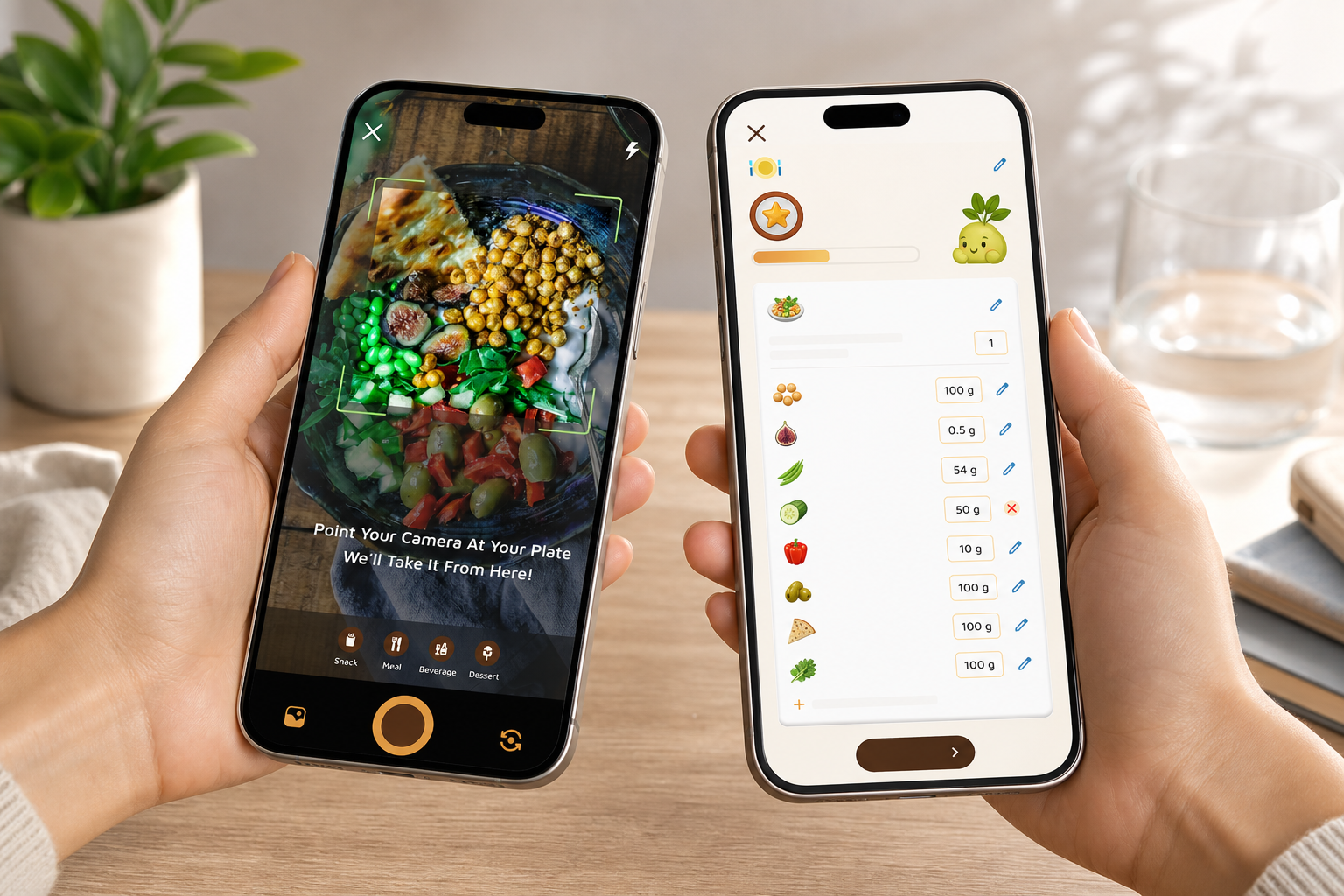
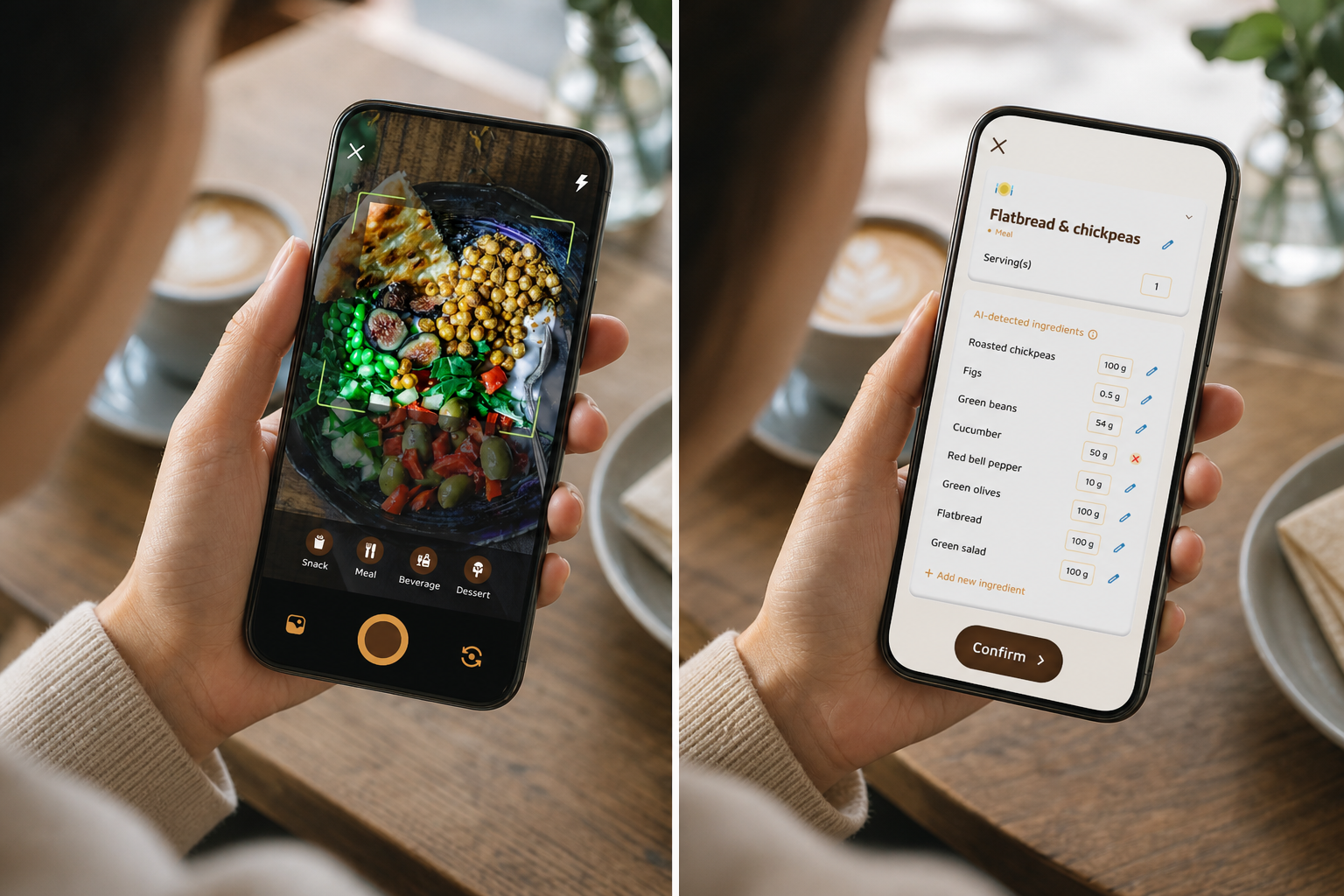
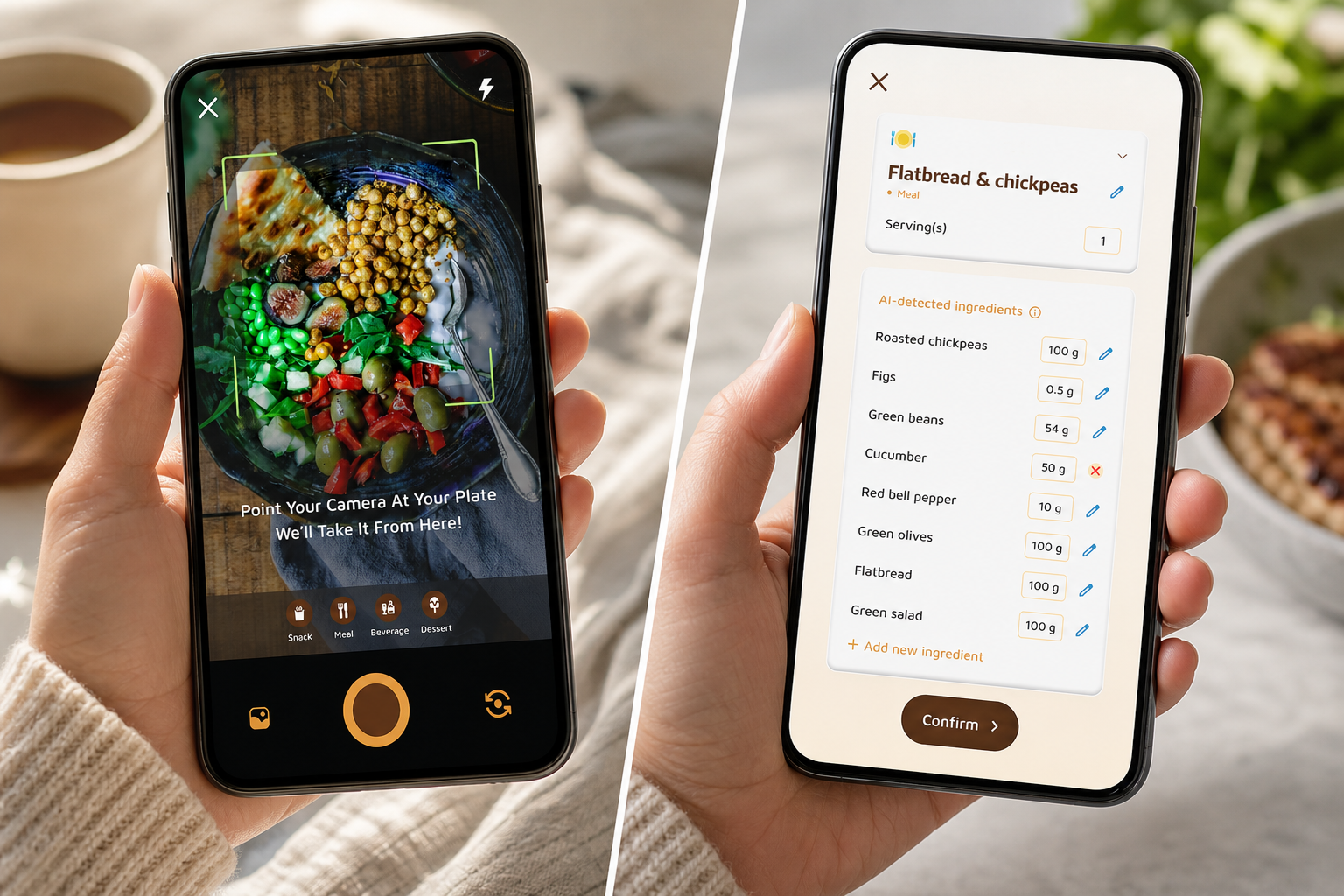
Example: Snap photos of your meals (photo-based tracking saves time), turn on real-time updates for steps and meals, and let the app compile trends. You might spot that your afternoon snack adds 400+ calories without much fullness.
Steps 4–6: Momentum
-
Use coaching feedback to pick one change
Don’t overhaul your diet. Choose one small shift based on the app’s real-time meal tips.
Example: The tracker flags low protein at breakfast. Your one change: add 20g of protein to breakfast all week. The app may send personalized fitness tips based on your progress, like adding Greek yogurt or eggs, and show how that affects your daily goal. -
Accept challenges to build momentum
Small weekly challenges create quick wins that stack.
Example: Take a custom challenge: “Eat a vegetable with every lunch this week.” The app tracks streaks and shows your buddy “growing” as you hit goals. You can also set a 10,000-steps-per-day target and watch real-time updates on steps and calorie burn. -
Review weekly, not daily
Daily weight and calorie swings can spark anxiety. Weekly trends tell the real story.
Example: Each Sunday, review your 7-day average intake, steps, water, and energy. Keep what worked, and add one new challenge. The app’s goal predictions help you plan next week’s meals more confidently.
For more setup tips, skim the quick-start ideas in the daily calorie tracker guide, then return here to keep going. As a result, your first week in 2026 will feel clear, not strict.
5 Common Mistakes Beginners Make with Calorie Tracking (and How Coaching Helps)
Almost every beginner does these. No shame, just fixes you can use today.
-
Obsessing over exact numbers
Being within about 100 calories is fine. Perfection drains willpower and kills consistency.
Fix: Use your tracker’s ranges and goal predictions to guide choices, not punish slips. Coaching notes explain why “close enough” still moves you forward. -
Forgetting beverages, oils, and sauces
Invisible calories add up fast. A tablespoon of oil or a sweet latte can blow past your plan.
Fix: Turn on prompts that ask about drinks and cooking oils. Photo-based logging helps you capture the whole plate, including dressings. -
Setting goals too aggressively
A 1,200-calorie goal might look “disciplined,” but for most people it backfires with hunger and binges.
Fix: Let the coaching feature flag unsustainable targets and guide you to a 300–500 calorie deficit instead. You’ll feel better and stick with it longer. -
Only tracking “bad” days
Skipping logs on tough days hides patterns you need to see, like weekend grazing.
Fix: Log every day. Real-time feedback on meals and snacks is even more helpful on messy days. You’ll spot the one swap that would have helped. -
Ignoring macros entirely
1,500 calories made mostly of refined carbs will feel different from 1,500 with balanced protein and fat.
Fix: Start simple: aim for a protein target each meal. Your tracker can display macros (carbs, protein, fat), water, and exercise. Coaching nudges teach you one idea at a time, no nutrition degree needed.
Many users find that coaching prompts, habit-building challenges, and progress feedback help them maintain tracking routines longer than traditional calorie-counting methods. Rather than focusing on perfect daily numbers, these tools encourage gradual improvements and sustainable behavior changes over time.
Moreover, remember that your progress shows up in weekly reviews, not single meals. Therefore, pause, breathe, and use your tracker to learn, not judge. That’s how beginners turn into consistent trackers.
When Coaching May Not Be Necessary
While coaching features can be helpful for many beginners, they are not essential for everyone. Some users prefer a simpler approach and may achieve their goals without additional guidance, challenges, or motivational tools.
Experienced calorie trackers, for example, often already understand portion sizes, calorie targets, and nutrition basics. They may only need a reliable food log and progress tracker rather than ongoing coaching prompts.
Likewise, some people prefer straightforward calorie-counting apps that focus on meal logging without challenges, streaks, or gamified features. For these users, a simpler interface can feel less distracting and easier to maintain over time.
Others may find coaching reminders, virtual rewards, or habit-building challenges motivating at first but unnecessary once tracking becomes part of their routine. As confidence and knowledge grow, the need for guided support may decrease.
Ultimately, the best calorie-tracking approach depends on your goals, experience level, and personal preferences. If coaching helps you stay consistent, it can be a valuable addition. If you prefer a more independent approach, a traditional calorie tracker may be all you need.
Also Read!
Tools and Apps That Combine Calorie Tracking with Coaching
You have options. Pick the tool you will use for 30+ days.
-
Full-featured apps with built-in coaching
Some apps add meal insights, behavior tips, and challenges to basic logging. For example, MyFitnessPal Premium offers meal-level feedback. Noom focuses on psychological coaching and daily lessons. Tools like Calorie Tracker Buddy combine photo-based meal logging with a Fitness Coach mode that can deliver personalized challenges, real-time feedback, and a virtual buddy that “grows” as you make healthier choices. In addition, customization for dietary preferences and allergies, and the ability to sync with fitness trackers like Google Fit, cut friction for beginners. -
Standalone coaching paired with a basic tracker
You can hire an online nutrition coach to review your food diary from any app and give advice in weekly check-ins. This works well if you want human accountability but still like your current tracker. -
Hybrid approaches
Some people use a simple tracker plus a community or an accountability partner. A shared challenge, like hitting a daily step target of 10,000, keeps you logging past the first week.
Which option fits you?
Who is each best for? If you want the lowest friction, choose a tracker with photo-based logging and real-time meal feedback. If you crave structure and daily lessons, a psychology-first app can help.
If you want quick coaching plus fun gamification, a virtual buddy and custom challenges keep you engaged after the novelty wears off. For a direct comparison of two popular styles, the Calorie Tracker Buddy vs Noom for Weight Loss: Which Is Better for Calorie Tracking with Coaching? breakdown highlights how coaching and challenges work day to day. And if you’re curious about database depth and community features, see myfitnesspal vs calorie tracker buddy.
Coach others and set challenges →
Finally, remember the “best” app is the one you’ll open tomorrow. A calorie tracker with coaching and challenges that reduces friction, photo snaps, instant tips, simple streaks, wins in the long run.
What to Do Next: Your First Week of Calorie Tracking with Coaching
Here’s a 7-day plan you can start today. The goal of week one isn’t weight loss, it’s awareness and routine.
-
Day 1–2: Onboard and observe
Download a coaching-enabled tracker, finish onboarding, and set your goal based on your TDEE. Input any dietary preferences or allergies so the tips match your needs. Log everything you eat and drink without changing anything. If you go offline, keep logging; the app can sync once back online. -
Day 3–4: Review feedback and pick one insight
Open your weekly trends and read the coaching notes. Identify your biggest surprise, maybe a daily drink added 250+ calories or breakfast had little protein. Choose one change for the next three days (e.g., swap one sugary drink for water, or add 20g protein to breakfast). Set your Daily Hydration Target to 2.5 Liter/Day and aim for a Daily Step Target of 10,000 Steps/Day so movement supports your plan. -
Day 5–6: Accept your first small challenge
Take a simple, custom challenge tied to your insight: “Add a vegetable at lunch” or “Close the protein gap at breakfast.” Watch your real-time progress bar for calories, steps, and meals. Celebrate tiny wins; your streaks and buddy growth will reflect them. -
Day 7: Weekly review
Check your 7-day average intake, how you felt, and which tips helped. Save one habit that worked, and set one new challenge for next week. Write two lines: “What I learned” and “What I’ll try next.” That’s it.
As you repeat this cycle into week two of 2026, you’ll notice that logging no longer feels awkward. It feels like checking your map before a drive, simple, fast, and useful.
Key Takeaways
- A calorie tracker with coaching and challenges turns logging into learning with real-time feedback and simple weekly wins.
- Start with a 300–500 calorie deficit, log three days without changes, then pick one coached adjustment.
- Track invisible calories (drinks, oils, sauces) and review progress weekly, not daily.
- Photo-based logging, goal predictions, and a virtual buddy reduce friction and keep you engaged past week one.
- The best tool is the one you’ll use for 30+ days; keep it simple and stay curious.
What to Do This Week
Download a coaching-enabled tracker, complete onboarding, and run the 7-day plan above. Log without judgment, accept one small challenge, and review on day seven. If you stay “close enough” and keep learning, the results will follow.
Conclusion
Calorie tracking works best when it becomes a sustainable habit rather than a short-term project. While logging food is important, consistency is often what determines long-term success. Coaching, challenges, and progress feedback can make that process easier by turning raw calorie data into practical actions you can follow each day.
The right calorie tracker depends on your goals and preferences. Some people prefer simple food logging, while others benefit from guided coaching, habit-building challenges, and motivational tools that keep them engaged. The key is choosing an approach that feels manageable enough to use consistently beyond the first week.
Whether your goal is weight loss, improved nutrition awareness, or building healthier habits, focus on steady progress rather than perfection. Small changes repeated consistently often deliver better results than aggressive plans that are difficult to maintain.
For broader context on app choices in 2026, you can also browse the best calorie tracker apps roundup or the Best Calorie Tracker with Virtual Pet for Beginners in 2026 guide before you commit your next 30 days.