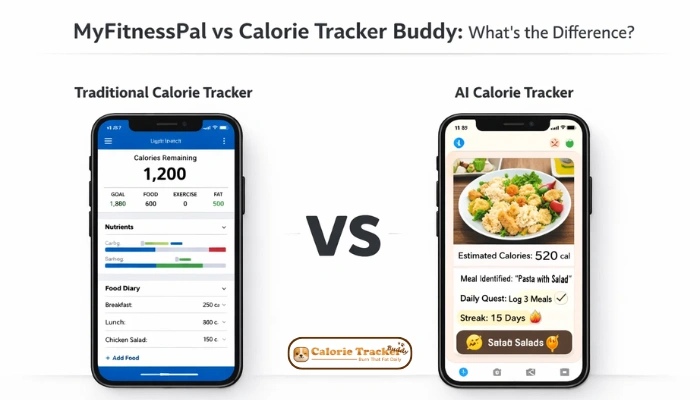
Choosing a calorie tracking app sounds simple until you open the app store and find dozens of options. Two names come up constantly in this space: MyFitnessPal, the long-established giant with a massive food database and deep fitness integrations, and Calorie Tracker Buddy, a newer AI-powered app best built around habit-building and gamification.
Both help you log food and monitor calories. But they take very different approaches, and depending on who you are and what you actually need, one will fit your life far better than the other.
This guide gives you a clear, honest comparison. No fluff. Just the practical differences that help you decide which app is worth your time.
In a hurry? Listen to the blog instead!
MyFitnessPal vs Calorie Tracker Buddy: Quick Comparison Snapshot
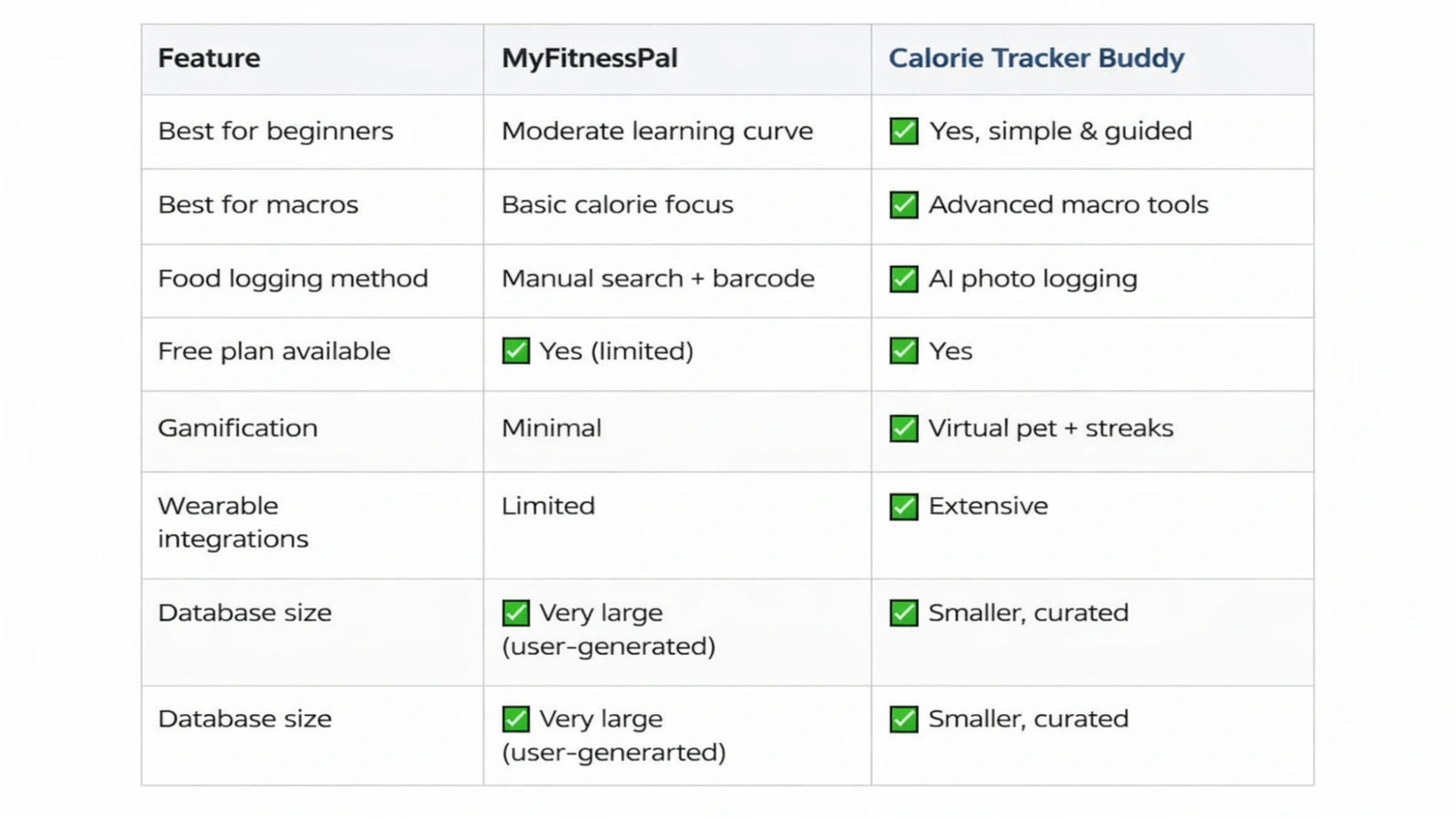
Here’s a fast overview before we get into the details.
App Overview: MyFitnessPal vs Calorie Tracker Buddy
What Is MyFitnessPal?
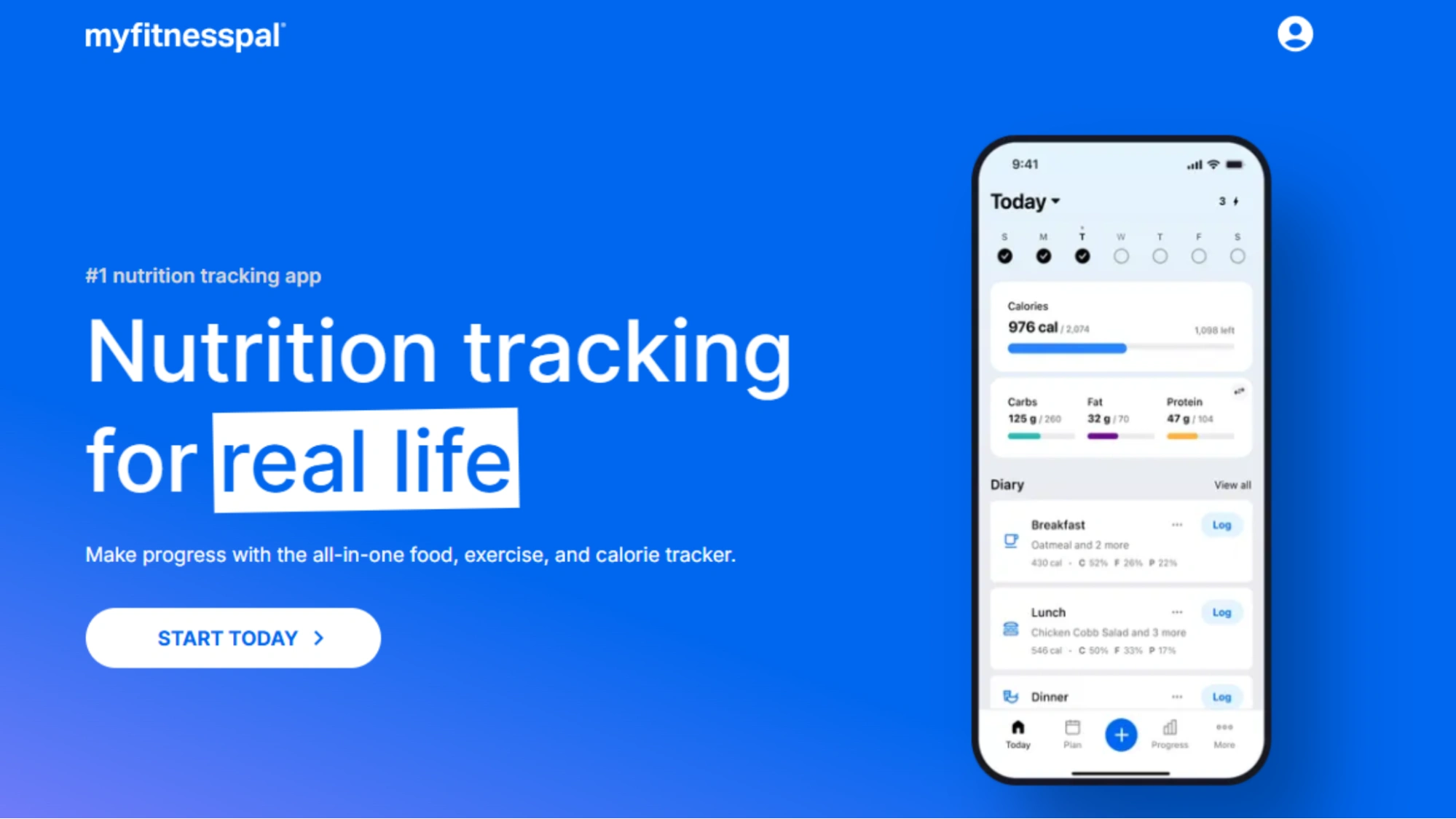
MyFitnessPal has been around since 2005 and is one of the most widely used fitness apps in the world. It built its reputation on a massive, user-generated food database, detailed macro tracking, and deep integrations with wearables and fitness platforms. It’s the go-to tool for people who want granular data, grams of protein, net carbs, micronutrient breakdowns, and who are comfortable spending a few minutes logging each meal manually.
Its ecosystem is mature. It connects to Fitbit, Apple Health, Garmin, and dozens of other platforms. For serious fitness enthusiasts or anyone who’s been tracking for years, that depth is genuinely valuable.
What Is Calorie Tracker Buddy?
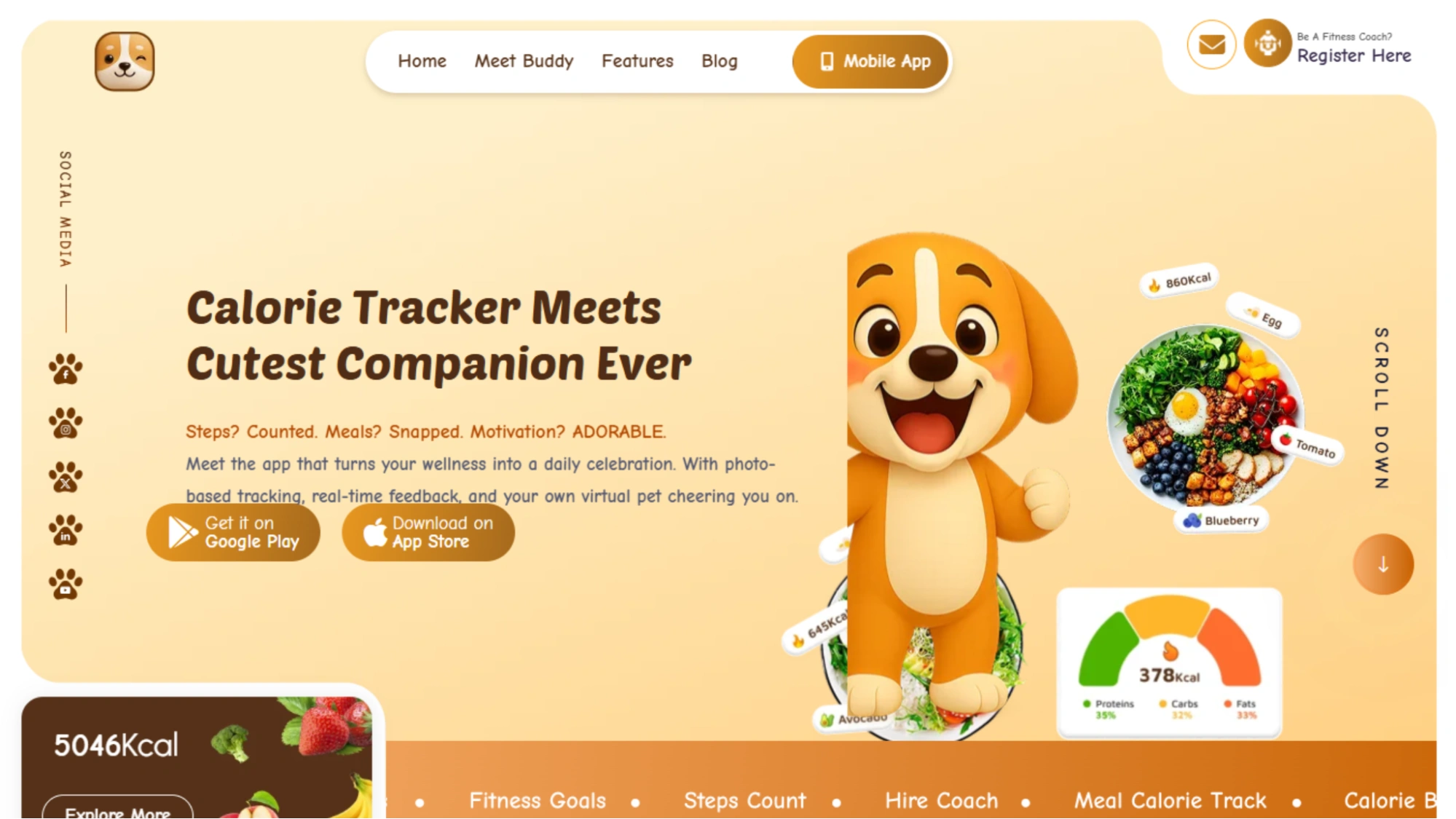
Calorie Tracker Buddy is a newer entrant that takes a fundamentally different philosophy. Instead of asking you to search a database and log every ingredient, it uses AI photo recognition. You snap a picture of your meal, and the app estimates the calories automatically. It also layers in gamification: a virtual companion, habit streaks, and reward mechanics designed to keep you engaged and motivated over time.
The pitch is simplicity. Calorie Tracker Buddy is built for people who’ve tried calorie tracking before, found it tedious, and gave up. It trades some precision for a much lower barrier to entry.
Food Logging Experience: Manual vs AI Tracking
How MyFitnessPal Tracks Meals
MyFitnessPal’s logging workflow is familiar to anyone who’s used a diet app in the last decade: search for a food, find the right entry, adjust the serving size, log it. The database has over 14 million foods, including restaurant items, branded products, and user-submitted recipes. There’s also a barcode scanner for packaged foods, and you can save frequently eaten meals to speed things up.
The trade-off is time. Logging a full day of meals, especially home-cooked ones with multiple ingredients, can take five to fifteen minutes, depending on how carefully you track. For many users, that friction is what eventually leads to abandonment.
How Calorie Tracker Buddy Uses AI Photo Logging
Calorie Tracker Buddy’s photo logging is its standout feature. Point your camera at a plate, tap, and the app returns a calorie estimate within seconds. It’s not perfect; complex mixed dishes or unfamiliar cuisines can trip it up, but for everyday meals, it’s accurate enough to be genuinely useful.
The speed difference is significant. What takes several minutes in MyFitnessPal takes about ten seconds in Calorie Tracker Buddy. For busy users who’ve always found logging too time-consuming, that difference is often what determines whether they actually stick with tracking at all.
Nutrition Tracking, Macros & Database Accuracy
MyFitnessPal’s Advanced Macro Insights
MyFitnessPal gives you a complete nutritional picture. You can set custom targets for protein, carbohydrates, fat, fiber, sugar, sodium, and more. The app displays your daily intake against those targets in real time, with charts and weekly trend reports. For anyone following a specific dietary protocol, high protein, low carb, keto, this level of detail is hard to beat.
The database size is both a strength and a weakness. With 14 million entries, you can find almost anything. But because many entries are user-submitted, accuracy varies. Duplicate entries, incorrect serving sizes, and outdated nutritional data are genuine issues that require some savviness to navigate.
Calorie Tracker Buddy’s Simplified Nutrition Tracking
Calorie Tracker Buddy takes a calorie-first approach. The primary dashboard shows calories in versus a daily target, with a simpler breakdown of protein, carbs, and fat. It won’t satisfy someone who needs to track 12 micronutrients, but for a beginner whose main goal is awareness of how much they’re eating, it’s exactly the right level of detail.
The app’s curated database is smaller than MyFitnessPal’s, but entries tend to be more reliably accurate because they’re not crowd-sourced. When combined with AI photo estimates for quick logging, most users find the accuracy sufficient for day-to-day tracking.
User Experience & App Design
MyFitnessPal’s Data-Driven Interface
MyFitnessPal is built for people who like data. The dashboard surfaces Calorie Burn totals, macro breakdowns, exercise logs, weight trends, and nutrition reports. There’s a lot of information available, which experienced users appreciate, but it can feel overwhelming for someone just starting. The interface hasn’t changed dramatically in years, and some users find it dated compared to newer apps.
Calorie Tracker Buddy’s Gamified Experience
Calorie Tracker Buddy’s design is deliberately more engaging. The virtual companion, a character that reacts to your habits, celebrates streaks, and nudges you gently when you miss a log, adds an emotional layer that most health apps skip entirely. Habit streaks, achievement badges, and daily check-ins make the app feel less like a chore and more like a routine.
This matters more than it might sound. Motivation is the most common reason people stop tracking. An app that’s actually enjoyable to open each day has a real advantage over one that’s purely functional.
Read More!
Notebook Logging Vs. App Logging: A Pros And Cons List
Why Free Calorie Trackers Are Often Better Than Paid Coaches?
Pricing & Free Plan Comparison
Is MyFitnessPal a Free Calorie Counter?
MyFitnessPal has a free tier, but it comes with meaningful limitations. The free plan includes basic calorie and macro tracking, the food database, and barcode scanning. However, several features, including food analysis, advanced macro goals, meal planning tools, and ad removal, are locked behind MyFitnessPal Premium, which costs around $19.99 per month or $79.99 per year.
For casual users, the free plan is workable. For anyone who wants the full experience, it’s a subscription app in practice.
Is Calorie Tracker Buddy Free?
Calorie Tracker Buddy offers a free plan that includes AI photo logging, basic Calorie Burn tracking, and the core gamification features. A premium tier unlocks more detailed nutrition insights, advanced AI features, and an ad-free experience. Pricing is competitive with MyFitnessPal, though the free plan is generally considered more generous for everyday use.
Integrations & Fitness Ecosystem
This is one area where MyFitnessPal has a clear, significant advantage. It integrates with Apple Health, Google Fit, Fitbit, Garmin, Polar, Withings, and dozens of other platforms. If you already use fitness wearables or other health apps, MyFitnessPal slots into that ecosystem seamlessly. It can pull in exercise data automatically and adjust your remaining calorie budget accordingly.
Calorie Tracker Buddy’s integrations are more limited at this stage. It connects with the major health platforms but lacks the breadth of third-party support that MyFitnessPal has built over nearly two decades. For users who are heavily invested in a fitness tech ecosystem, this is a genuine limitation worth considering.
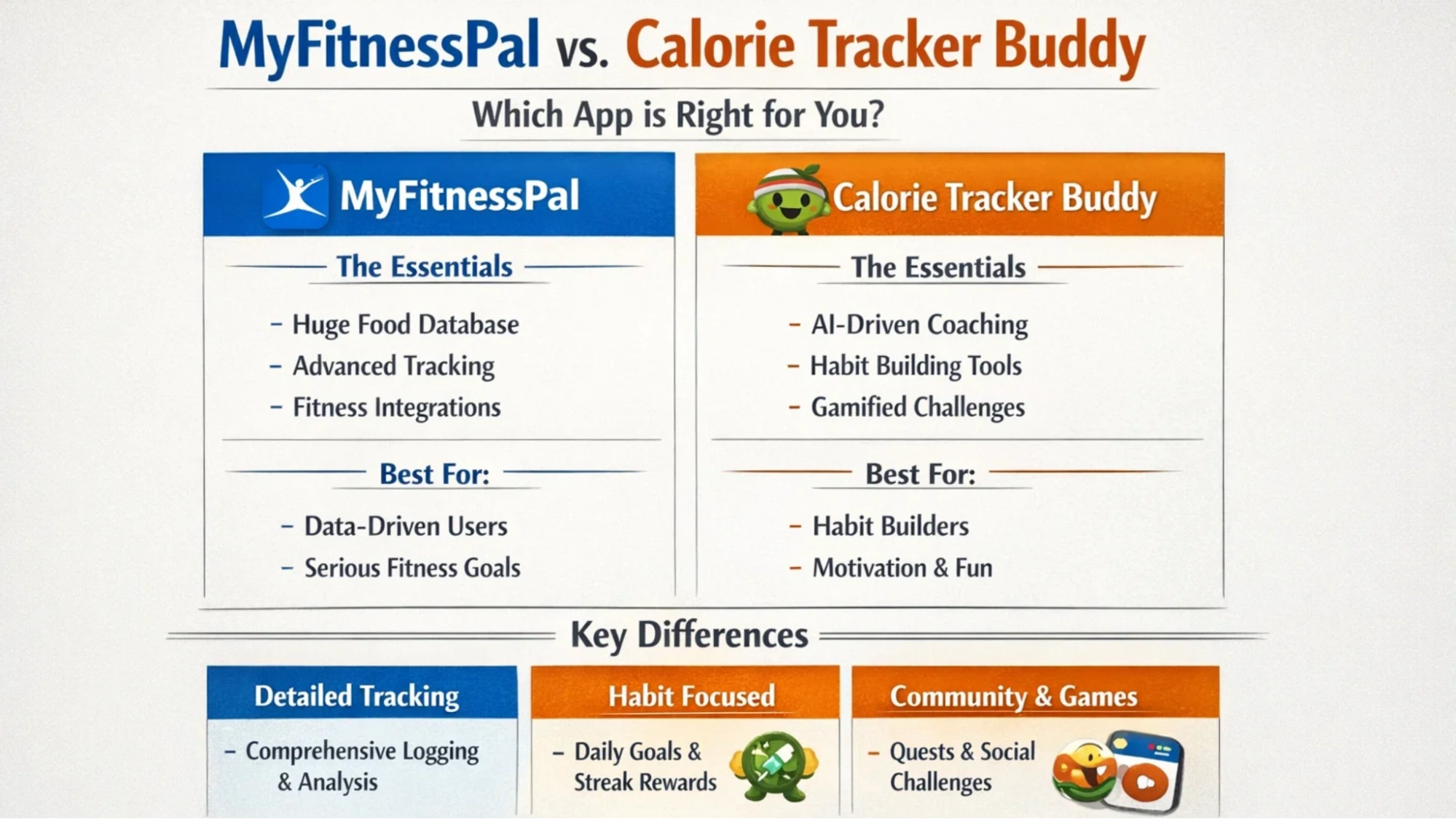
Who Should Use Each App?
Best for Beginners
Calorie Tracker Buddy. The simplified interface, AI photo logging, and gamified onboarding remove the friction that causes most beginners to quit. You don’t need to know what a macro is to start; you just snap a photo, and the app does the work.
Best for Weight Loss
Both work, but for different reasons. MyFitnessPal gives you the data precision to optimize your deficit carefully. Calorie Tracker Buddy’s habit-building tools make it easier to stay consistent — and consistency is what actually produces weight loss over time. If you’ve struggled with adherence before, Buddy’s engagement mechanics may serve you better.
Best for Macro Tracking
MyFitnessPal, without question. If you’re following a structured nutrition protocol that requires tracking protein to the gram, MyFitnessPal’s depth and customization is unmatched.
Best for Busy Users
Calorie Tracker Buddy. The AI photo logging makes it realistic to track on a hectic schedule. MyFitnessPal’s manual logging workflow, while thorough, requires time that busy users often don’t have.
Best for Habit Building
Calorie Tracker Buddy. The gamification layer, streaks, virtual companion, and daily check-ins are purpose-built for habit formation in a way that MyFitnessPal simply isn’t.

Pros and Cons: MyFitnessPal vs Calorie Tracker Buddy
MyFitnessPal Pros
- Enormous food database with 14+ million entries
- Advanced macro and micronutrient tracking
- Extensive wearable and platform integrations
- Detailed reports and trend analysis
- Mature ecosystem with a large user community
MyFitnessPal Cons
- Manual logging is time-consuming and creates friction
- User-submitted database entries vary in accuracy
- Key features are locked behind a relatively expensive premium tier
- Interface feels dated compared to newer apps
- High abandonment rate among casual users
Calorie Tracker Buddy Pros
- AI photo logging is fast and beginner-friendly
- Gamification genuinely improves daily engagement and retention
- Generous free plan for everyday tracking
- Simpler interface with a lower learning curve
- Curated database tends to be more consistently accurate
Calorie Tracker Buddy Cons
- Smaller food database than MyFitnessPal
- AI photo estimates can be less accurate for complex or unfamiliar dishes
- Fewer wearable and third-party integrations
- Less depth for advanced macro or micronutrient tracking
Real User Feedback & Reviews
MyFitnessPal Reviews: What Users Like & Dislike
MyFitnessPal reviews consistently praise the database size and the depth of macro tracking. Long-term users and fitness enthusiasts tend to rate it highly. The most common complaints in MyFitnessPal reviews center on logging fatigue — the daily grind of searching and entering every food — and frustration with features being progressively moved behind the premium paywall. Many users report using it for a few weeks, then drifting away.
Calorie Tracker Buddy Reviews: User Experience Insights
Calorie Tracker Buddy reviews highlight ease of use and the motivational design as the app’s biggest strengths. Users who’ve tried and abandoned other trackers frequently cite Buddy as the first app that made tracking feel sustainable. Critical feedback in Calorie Tracker Buddy reviews tends to focus on occasional inaccuracies in AI photo estimates and the wish for deeper nutrition data. Overall sentiment skews positive, particularly among users who prioritize consistency over precision.
Final Verdict: MyFitnessPal vs Calorie Tracker Buddy
These are genuinely different apps solving the same problem in different ways — and neither is universally better.
Choose MyFitnessPal if you want data precision, advanced macro control, and deep fitness ecosystem integrations. It’s the right tool for experienced trackers, athletes, and anyone following a structured nutrition protocol who doesn’t mind the manual logging workflow.
Choose Calorie Tracker Buddy if you want simplicity, speed, and the kind of daily motivation that keeps you coming back. It’s the right tool for beginners, busy people, and anyone who’s tried calorie tracking before and found it too tedious to sustain.
The best calorie tracker app is ultimately the one you’ll actually open every day. A slightly less precise tool you use consistently will always beat a more powerful one you abandon after three weeks.
Frequently Asked Questions
Is MyFitnessPal free?
MyFitnessPal has a free plan that covers basic calorie and macro tracking plus database access. However, several useful features — including advanced macro goals, meal analysis, and an ad-free experience — require a paid Premium subscription.
Is Calorie Tracker Buddy free?
Yes, Calorie Tracker Buddy offers a free plan that includes AI photo logging and core gamification features. A premium tier is available for users who want deeper nutrition insights and additional AI capabilities.
Which calorie tracker app is best for beginners?
Calorie Tracker Buddy is generally the better choice for beginners. The AI photo logging removes the friction of manual entry, and the gamified design helps new users build a consistent tracking habit without feeling overwhelmed.
Which app is more accurate for calorie tracking?
It depends on the type of accuracy you mean. MyFitnessPal’s database is larger but includes user-submitted errors. Calorie Tracker Buddy’s database is smaller but more curated, and its AI estimates are accurate enough for most everyday meals. For precise macro tracking, MyFitnessPal has the edge.
Can I use both apps together?
You could, but it’s unlikely to be necessary. The ap
Calorie Tracker Buddy reviews,
MyFitnessPal reviews,
Best calorie tracker app,
Free calorie counter,
ps serve different users well. If you’re finding MyFitnessPal’s logging too time-consuming, switching to Calorie Tracker Buddy entirely is a more practical move than trying to run both simultaneously.